Forums on Intune, SCCM, and Windows 11

Welcome to the forums. Register a free account today to become a member! Once signed in, you'll be able to participate on this site by adding your topics and posts, as well as connect with other members through your own private inbox!

SOLVED SCCM Client Fails to register

  • Thread starter Thread starter HenryEZ
  • Start date Start date
  • Replies Replies 3
  • Views Views 6K

HenryEZ

New Member
Messages
3
Solutions
1
Reaction score
1
Points
3
Hey All,
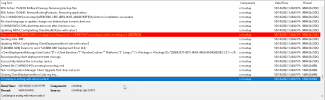
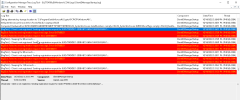
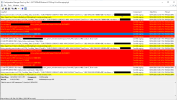
I have a bit of an issue with a client failing to register with SCCM. We run everything over HTTPS so we have a Windows CA that handles our certs. I have uninstalled and reinstalled the client on the machine with no issues and I have double check certs on the server and the client. I have even deleted the client certs and issues new ones, but I keep getting an error that "Access check failed against user 'ComputerAccount$'" I have seen some WMI error in the logs but when I check WMI by running "winmgmt /verifyrepository" on the client it states "WMI repository is consistent". I initially thought it was an issue with the MP but other devices have been able to register with SCCM. Any help would be greatly appreciated.
1665786818207.png
1665787009844.png
1665787176065.png
 
Hey All,
I have a bit of an issue with a client failing to register with SCCM. We run everything over HTTPS so we have a Windows CA that handles our certs. I have uninstalled and reinstalled the client on the machine with no issues and I have double check certs on the server and the client. I have even deleted the client certs and issues new ones, but I keep getting an error that "Access check failed against user 'ComputerAccount$'" I have seen some WMI error in the logs but when I check WMI by running "winmgmt /verifyrepository" on the client it states "WMI repository is consistent". I initially thought it was an issue with the MP but other devices have been able to register with SCCM. Any help would be greatly appreciated.
View attachment 4820
View attachment 4821
View attachment 4822
I am having the same issue with a few hundred machines. Clients that were working fine a few months ago just stopped working one day. They all have these same messages in ccmmessaging.log. I've checked everything. Nothing has been changed on the Site Server. Clients in the same subnet have no issue. The logs show the client selecting a PKI cert. Reimaging the machine fixes this issue, but that is not practical for my environment. I've seen a few threads about this issue across the Internet, never a resolution. Any help would be greatly appreciated.

Thank you.
 
Hey All,
I have a bit of an issue with a client failing to register with SCCM. We run everything over HTTPS so we have a Windows CA that handles our certs. I have uninstalled and reinstalled the client on the machine with no issues and I have double check certs on the server and the client. I have even deleted the client certs and issues new ones, but I keep getting an error that "Access check failed against user 'ComputerAccount$'" I have seen some WMI error in the logs but when I check WMI by running "winmgmt /verifyrepository" on the client it states "WMI repository is consistent". I initially thought it was an issue with the MP but other devices have been able to register with SCCM. Any help would be greatly appreciated.

View attachment 4820
View attachment 4821
View attachment 4822
Leaving this here for anyone who comes across it. Every post I've seen about these exact errors has been unanswered across the Internet. Please confirm that you have this issue before proceeding ie check your logs, network, PKI, boundaries, and MP assignment and that your errors in ccmmessaging.log exactly match the OP's.

What worked for me was the following:

1. Log into affected machine
2. Delete the machine from AD
3. Remove the PC from the domain - DO NOT RESTART - choose RESTART LATER
4. Restart the SMS Agent service on the machine and wait to see if it starts talking to the MP. You should see ccm\logs start filling up. Confirm delivery to MP in ccmmessaging.log "...delivered successfully to MP"
5. I wait until the machine reappears with a green check in the console
6. Rejoin the PC to the domain and reboot.
7. Confirm everything is good. Log in and check SCCM logs and PKI in SCCM Control Panel applet

I have started bringing back all my PCs this way. Can't say why this inexplicably happens or why this worked for me. I have noticed this issue only appears on a few machines. Hoping it helps others. This drove me crazy for the better part of a year.
 

Forum statistics

Threads
7,133
Messages
27,858
Members
18,151
Latest member
TonyGTR
Back
Top