Fatsausage
Member
- Messages
- 7
- Solutions
- 1
- Reaction score
- 0
- Points
- 1
Hello all,
I've found that the software count is having problem in Asset Intelligence. Our site have 2200+ active clients with hardware inventory and AI turned on for a long time.
I customized some reports using the data (only doing SELECT) from the table [dbo].[INSTALLED_SOFTWARE_DATA] and had been neat and nice.
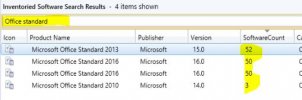
Recently we upgraded to 2006 and found that the software count number is having problem and only very few software numbers are counted.
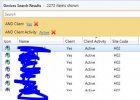
e.g. All clients are either having Office 2013 or 2016 installed (it's inside the windows 10 deployment WIM image) and only some of them are counted.
I went directly into the [dbo].[INSTALLED_SOFTWARE_DATA] table and found that it contains only 8000+ rows (which is very few compared to what expected to be 200k+ rows)
What caused the problem and how may I fix it?
Thanks!
Andrew
I've found that the software count is having problem in Asset Intelligence. Our site have 2200+ active clients with hardware inventory and AI turned on for a long time.
I customized some reports using the data (only doing SELECT) from the table [dbo].[INSTALLED_SOFTWARE_DATA] and had been neat and nice.
Recently we upgraded to 2006 and found that the software count number is having problem and only very few software numbers are counted.
e.g. All clients are either having Office 2013 or 2016 installed (it's inside the windows 10 deployment WIM image) and only some of them are counted.
I went directly into the [dbo].[INSTALLED_SOFTWARE_DATA] table and found that it contains only 8000+ rows (which is very few compared to what expected to be 200k+ rows)
What caused the problem and how may I fix it?
Thanks!
Andrew