

timmyrichy123
Member
- Messages
- 8
- Reaction score
- 0
- Points
- 1
Hello Together,
I'm really getting desperate now.
I'm very new by using SCCM and have some issues to deploy a OS to my Clients.
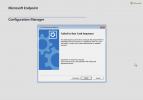
After I disabled PXE and uninstall WDS on my SCCM Server, I was first able to run a PXE Boot on one of my Clients. I select the Task sequence and become the message: Task Sequence failed because the file <filename> cannot be located on a Distribution point.
First I thought the Configuration Manager Client Package are damaged, but I try to create a other package to test it and have the same issue.
It came the same message with the filename of my boot image.
In other threads someone has written it could be an issue with boundary Groups, but I have no idea how to configure that and this was in SCCM 2012.
I hope someone could help me.
Thanks for you reply.
I'm really getting desperate now.
I'm very new by using SCCM and have some issues to deploy a OS to my Clients.
After I disabled PXE and uninstall WDS on my SCCM Server, I was first able to run a PXE Boot on one of my Clients. I select the Task sequence and become the message: Task Sequence failed because the file <filename> cannot be located on a Distribution point.
First I thought the Configuration Manager Client Package are damaged, but I try to create a other package to test it and have the same issue.
It came the same message with the filename of my boot image.
In other threads someone has written it could be an issue with boundary Groups, but I have no idea how to configure that and this was in SCCM 2012.
I hope someone could help me.
Thanks for you reply.

