Forums on Intune, SCCM, and Windows 11

Welcome to the forums. Register a free account today to become a member! Once signed in, you'll be able to participate on this site by adding your topics and posts, as well as connect with other members through your own private inbox!

SOLVED Microsoft 365 App Query in SCCM

  • Thread starter Thread starter juannabis
  • Start date Start date
  • Replies Replies 13
  • Views Views 6K
Status
Not open for further replies.

juannabis

Well-Known Member
Messages
96
Solutions
1
Reaction score
0
Points
6
Hi,
I need to create a query for to search Microsoft 365, query wit WQL.
How can I use the "v_ADD_REMOVE_PROGRAMS" table?
If I use the "v_GS_ADD_REMOVE_PROGRAMS" table, I don't find any PC wit Microsoft 365.
I have a report with this two table:
1. With "v_ADD_REMOVE_PROGRAMS" table I have the Pc's with Microsoft 365.
2. With "v_GS_ADD_REMOVE_PROGRAMS" table I don't have the Pc's with Microsoft 365.

Thank you.
 
Both of those are SQL and NOT WQL.
v_GS_ADD_REMOVE_PROGRAMS is for 32bit applications.
v_GS_ADD_REMOVE_PROGRAMS_64 if for 64bit applications.
v_ADD_REMOVE_PROGRAMS is a union of both of those view.

There is already a built-in report for this.
 
Yes, I know ... but I don't understand, Microsoft 365 is x86 and it find with v_GS_ADD_REMOVE_PROGRAMS_64.

Thank you.
 
How can I create this query?

The results is empty, both of Installed Applications (64) and Installed Applications.

In the report with v_ADD_REMOVE_PROGRAMS I get the pc's with Microsoft 365.

Thank you.
 

Attachments

  • query_office365.jpg
    query_office365.jpg
    47 KB · Views: 8
How can I create this query?

The results is empty, both of Installed Applications (64) and Installed Applications.

In the report with v_ADD_REMOVE_PROGRAMS I get the pc's with Microsoft 365.

Thank you.
What exactly does your query look like now?
 
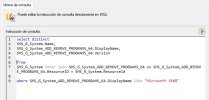
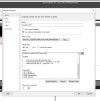
My query is:

select distinct SMS_R_System.Name, SMS_G_System_ADD_REMOVE_PROGRAMS_64.DisplayName, SMS_G_System_ADD_REMOVE_PROGRAMS_64.Version from SMS_R_System inner join SMS_G_System_ADD_REMOVE_PROGRAMS_64 on SMS_G_System_ADD_REMOVE_PROGRAMS_64.ResourceID = SMS_R_System.ResourceId inner join SMS_G_System_ADD_REMOVE_PROGRAMS on SMS_G_System_ADD_REMOVE_PROGRAMS.ResourceId = SMS_R_System.ResourceId where SMS_G_System_ADD_REMOVE_PROGRAMS_64.DisplayName like "Microsoft 356%" or SMS_G_System_ADD_REMOVE_PROGRAMS.DisplayName like "Microsoft 365%"

My report is:

SELECT DISTINCT
GSCS.Name0 AS [Nombre],
GSCS.UserName0 AS [Usuario],
GARP.DisplayName0 AS [Software],
GARP.Version0 AS [Versión]
FROM fn_rbac_R_System_Valid(@UserSIDs) FRRS
JOIN v_GS_COMPUTER_SYSTEM GSCS ON GSCS.ResourceID=FRRS.ResourceID
JOIN v_FullCollectionMembership FCM ON FCM.ResourceID=GSCS.ResourceID
JOIN v_ADD_REMOVE_PROGRAMS GARP ON GARP.ResourceID=GSCS.ResourceID
WHERE
FCM.CollectionID=@Collection AND
GARP.DisplayName0 LIKE '%'+@Software+'%' AND
GARP.Version0 LIKE '%' + @Version + '%'
GROUP BY
GSCS.Name0,
GSCS.UserName0,
GARP.DisplayName0,
GARP.Version0


My query has 0 results.
My report has many results.

Thank you.
 

Attachments

  • query_office365_v1.jpg
    query_office365_v1.jpg
    49.9 KB · Views: 2
Hello,
Now I have this query...

select distinct
SMS_R_System.Name,
SMS_G_System_ADD_REMOVE_PROGRAMS_64.DisplayName,
SMS_G_System_ADD_REMOVE_PROGRAMS_64.Version

from
SMS_R_System inner join SMS_G_System_ADD_REMOVE_PROGRAMS_64 on SMS_G_System_ADD_REMOVE_PROGRAMS_64.ResourceID = SMS_R_System.ResourceId

where SMS_G_System_ADD_REMOVE_PROGRAMS_64.DisplayName like "Microsoft 356%"

But I don't have results.

Thank you.
 

Attachments

  • query_office365_v2.jpg
    query_office365_v2.jpg
    48.2 KB · Views: 4
So notice that your SQL query and WQL are not matching. In your Where section your are different.

SQL
GARP.DisplayName0 LIKE '%'+@Software+'%' AND
GARP.Version0 LIKE '%' + @Version + '%'

WQL
SMS_G_System_ADD_REMOVE_PROGRAMS_64.DisplayName like "Microsoft 356%"

Is the SW called Microsoft 356?

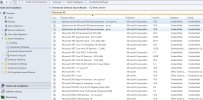
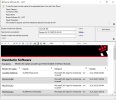
What exactly is listed within resource explorer for this software?
 
Hello,

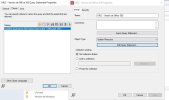
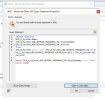
I attach my report, my query and my software list.

Thank you.
 

Attachments

  • Report_SQL_1.jpg
    Report_SQL_1.jpg
    103.1 KB · Views: 27
  • Report_SQL_2.jpg
    Report_SQL_2.jpg
    86.1 KB · Views: 22
  • Report_SQL_3.jpg
    Report_SQL_3.jpg
    116.2 KB · Views: 19
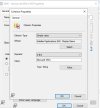
  • query_office365.jpg
    query_office365.jpg
    47 KB · Views: 25
  • Query_WQL_1.jpg
    Query_WQL_1.jpg
    73.5 KB · Views: 18
  • Query_WQL_2.jpg
    Query_WQL_2.jpg
    68.6 KB · Views: 22
  • SoftwareList.jpg
    SoftwareList.jpg
    180 KB · Views: 25
You are not looking for the same SW title. You have a typo in the name.
 
If I write the same SW title, I have the same results.
Thank you.
 

Attachments

  • Query_WQL_3.jpg
    Query_WQL_3.jpg
    73.6 KB · Views: 13
  • Query_WQL_4.jpg
    Query_WQL_4.jpg
    33.8 KB · Views: 10
SORRY

I need to change my glasses, I find the mistake, 356 by 365.

Sorry and thank you very much.
 
Status
Not open for further replies.

Forum statistics

Threads
7,133
Messages
27,858
Members
18,151
Latest member
TonyGTR
Back
Top