
Hi All
I recently upgraded to SCCM 2303. Since the upgrade, all PXE installs, via a task sequence are hanging at the Setup Operating System > Setup Windows and configuration step: see below screenshot:
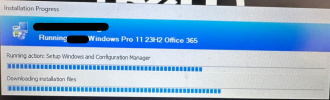
The below is the last line of the smsts.log. (no errors relating to the failure anywhere else)
Executing command line: C:\_SMSTaskSequence\OSD\RPK00003\ccmsetup.exe /useronly /source:C:\_SMSTaskSequence\OSD\RPK00003 /config:MobileClient.TCF /status:1056 with options (0, 0)
ccmsetup.log has the following:
Downloading C:\_SMSTaskSequence\OSD\RPK00003\x64\client.msi to C:\WINDOWS\ccmsetup\client.msi
Failed to access source file (2). Waiting for retry...
It successfully copies the client folder from the SCCM server to the client. I can see the files in C:\_SMSTaskSequence\OSD\RPK00003\x64\ but it failes to copy to the C:\WINDOWS\ccmsetup\
Any ideas please?
Thanks,
I recently upgraded to SCCM 2303. Since the upgrade, all PXE installs, via a task sequence are hanging at the Setup Operating System > Setup Windows and configuration step: see below screenshot:
The below is the last line of the smsts.log. (no errors relating to the failure anywhere else)
Executing command line: C:\_SMSTaskSequence\OSD\RPK00003\ccmsetup.exe /useronly /source:C:\_SMSTaskSequence\OSD\RPK00003 /config:MobileClient.TCF /status:1056 with options (0, 0)
ccmsetup.log has the following:
Downloading C:\_SMSTaskSequence\OSD\RPK00003\x64\client.msi to C:\WINDOWS\ccmsetup\client.msi
Failed to access source file (2). Waiting for retry...
It successfully copies the client folder from the SCCM server to the client. I can see the files in C:\_SMSTaskSequence\OSD\RPK00003\x64\ but it failes to copy to the C:\WINDOWS\ccmsetup\
Any ideas please?
Thanks,

