Forums on Intune, SCCM, and Windows 11

Welcome to the forums. Register a free account today to become a member! Once signed in, you'll be able to participate on this site by adding your topics and posts, as well as connect with other members through your own private inbox!

PENDING PXE Client-Error via WDS boot\x64\wdsmgfw.efi not found

  • Thread starter Thread starter bom2010
  • Start date Start date
  • Replies Replies 3
  • Views Views 12K

bom2010

Member
Messages
10
Reaction score
0
Points
1
Hi Everyone,
We're deploying win 10 via PXE boot but got an error during deloy.
Hope anyone can take a look error code and give me any advices
Thank so much !

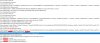
Screenshot_134.jpg
 
sure wdsmgfw.efi exist Prajwal.
On the same IP range it's working well, but on another IP range it got error like my picture attached.
I tried deploy package to specific PC is running window to another IP range seem that it's working well, it boot to task sequence and install window.
I also tried with correct path : E:\RemoteInstall\SMSBoot\x64\wdsmgfw.efi but got invalid request
 
Hi All!
I hope this helps. In my case, that solved it.
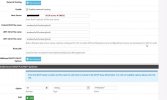
Due to the other network, the following values need to be included in the dhcp settings (PFsense).
- SCCM server is in "Server" VLAN,
- Clients are in "LAN" VLAN
Attached LAN's vlan DHCP options:
LAN1.jpg
 
Back
Top