Forums on Intune, SCCM, and Windows 11

Welcome to the forums. Register a free account today to become a member! Once signed in, you'll be able to participate on this site by adding your topics and posts, as well as connect with other members through your own private inbox!

PENDING Problems installing configuration manager 2409 update

  • Thread starter Thread starter michaelxia
  • Start date Start date
  • Replies Replies 9
  • Views Views 5K

michaelxia

Member
Messages
6
Reaction score
0
Points
1
Hi,
I have been trying to install the 2409 update for about a month, with no luck. I am able to download the update without any issue. However thats as far the update gets. I have attached an image on the status. As you can see its downloaded, but never moves onto the replication stage of the process.

I have rebooted the server.
I have used cmupdatereset to try and reset / download the update.

Any help would be appreciated.

Michael
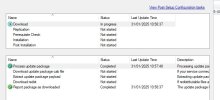
 

Attachments

Hi,
Thanks for your quick responses.

I have left the update over the weekend, and it still stays in that state.

michael
Hi,

A bit more info.
I have also created a test enviroment, to see if I could replicate the problem, and that works. The folder size for the 2409 update ( 3b7d84fa-eccc-4ea0-b8ab-abbda1e88e0e ), located in EasySetupPayload directory is 3.18 Gb, 4154 files. Thats the exact same on both my production server, and test server.

However. The folder size in CMUStaging folder is only 1.86 MB, and 36 files ( production server )
The folder size in CMUStaging is 3.18 Gb, and 4191 files ( test server )

Michael
 
Hi,

A bit more info.
I have also created a test enviroment, to see if I could replicate the problem, and that works. The folder size for the 2409 update ( 3b7d84fa-eccc-4ea0-b8ab-abbda1e88e0e ), located in EasySetupPayload directory is 3.18 Gb, 4154 files. Thats the exact same on both my production server, and test server.

However. The folder size in CMUStaging folder is only 1.86 MB, and 36 files ( production server )
The folder size in CMUStaging is 3.18 Gb, and 4191 files ( test server )

Michael
Would you be able to use this command to reset the download: D:\Program Files\Microsoft Configuration Manager\cd.latest\SMSSETUP\TOOLS\CMUpdateReset>CMUpdateReset.exe -S FQDNSITESERVER -D CM_SITECODE-P eed8001a-1fe8-45ce-b689-577e557bf8ea
 
Would you be able to use this command to reset the download: D:\Program Files\Microsoft Configuration Manager\cd.latest\SMSSETUP\TOOLS\CMUpdateReset>CMUpdateReset.exe -S FQDNSITESERVER -D CM_SITECODE-P eed8001a-1fe8-45ce-b689-577e557bf8ea
Thanks for the suggestion.
I have tried that tool a few times, but with 3b7d84fa-eccc-4ea0-b8ab-abbda1e88e0e. Is this copy and paste error, or do you have a reason to reset with that guid.

Michael
 
Thanks for the suggestion.
I have tried that tool a few times, but with 3b7d84fa-eccc-4ea0-b8ab-abbda1e88e0e. Is this copy and paste error, or do you have a reason to reset with that guid.

Michael
I have seen that few times, when the download is stuck for no reason, the only way it would work is to reset it.
 
I have seen that few times, when the download is stuck for no reason, the only way it would work is to reset it.
Hi.

I have tried that a few times. Using the FDELETE option as well. Still no luck.
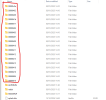
One thing I have noticed, is that when the update gets downloaded from the internet, it downloads fine into the EasySetupPayload folder, but when it transfers to the CMUStaging folder, it only creates / copies the folders highlighted in red.
1738944064901.png
The bottom three folders, and splash.hta do not get created.

Michael
 
Back
Top