Have the updates been distributed to the local DP where the clients are facing the download issues?. And is the boundary configured to include the clients in the scope, and is the boundary group associated with the correct DP?
Check the below thread once:
Hi,
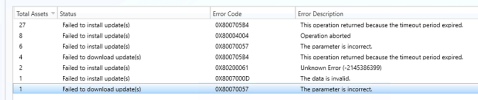
We have a newly setup MECM server and planning to update it with the latest july 20h2 update. However, the deployment status keeps UNKNOWN -greyed status and failed to install to all pilot pcs. Wsyncmgr n wuahandler logs shows no issues as the updates are able to be sync successfully.
The software updatese did not delivered to ccmcache as it should but it has advertise in the software compliance .
Boundaries were set directly to primary server.
add info :
http://mecmserver: 8530/ 403 - Forbidden: Access is denied.
any suggestion where should I look into to start remediating...
Yes the updates have been distributed to the DP servers. Yes the boundaries are configured to include the clients in the scope. All of my boundary groups are set up with IP ranges only. The boundary groups are all associated with the correct DP's I've verified this as well. What's making this incredibly difficult is there are some servers that are downloading and installing the updates just fine. These servers are in the same IP range as the other ones that aren't working. For some reason it's not getting the updates in the C:\Windows\ccmcache folder so it's just always stuck on 0% downloading when trying to install the updates. Below is what I'm continually seeing the in the DataTransferService.log. Let me know if you want to see any other of the log files but they all look relatively clean compared to DataTransferService.log
DTSLogon: Enumeration of DTS jobs for helper user 'S-1-5-21-2010463489-911686429-1392588124-46785' is complete. DataTransferService 2/25/2025 11:29:35 AM 2352 (0x0930)
DTSJob({C3CA66B2-30D5-439F-BC0B-4F7A14F4F439}):CDTSJob::HandleErrors - BITS Job '{37E952CC-57D0-4CDD-A142-244F137111FA}' under user 'S-1-5-18', OldErrorCount=0, NewErrorCount=4, ErrorCode 0x80072EE2, ErrorText='BITS error: 'The operation timed out
' Context: 'The error occurred while the remote file was being processed.
'' DataTransferService 2/25/2025 11:39:13 AM 8048 (0x1F70)
DTSJob({C3CA66B2-30D5-439F-BC0B-4F7A14F4F439}):CDTSJob::HandleErrors - URL='http://download.windowsupdate.com:80/d/msdownload/update/software/secu/2025/02' ProtType=1 DataTransferService 2/25/2025 11:39:13 AM 8048 (0x1F70)
DTSJob({C3CA66B2-30D5-439F-BC0B-4F7A14F4F439}):CDTSJob::HandleErrors - Downloading from
http://download.windowsupdate.com:80/d/msdownload/update/software/secu/2025/02 encountered a proxy error: BITS error: 'The operation timed out
' Context: 'The error occurred while the remote file was being processed.
'. Retrying 1 times DataTransferService 2/25/2025 11:39:13 AM 8048 (0x1F70)
DTSJob({C3CA66B2-30D5-439F-BC0B-4F7A14F4F439}):CDTSJob::JobError - BITS Job ID='{37E952CC-57D0-4CDD-A142-244F137111FA}' ErrorCode=0x80072EE2 DataTransferService 2/25/2025 11:39:13 AM 8048 (0x1F70)
DTSJob({C3CA66B2-30D5-439F-BC0B-4F7A14F4F439}):CDTSJob::JobError - URL='http://download.windowsupdate.com:80/d/msdownload/update/software/secu/2025/02' ProtType=1 DataTransferService 2/25/2025 11:39:13 AM 8048 (0x1F70)
DTSJob({C3CA66B2-30D5-439F-BC0B-4F7A14F4F439}):CDTSJob::JobError - BITS Job ID='{37E952CC-57D0-4CDD-A142-244F137111FA}' ErrorCode=0x80072EE2 DataTransferService 2/25/2025 11:44:13 AM 588 (0x024C)
DTSJob({C3CA66B2-30D5-439F-BC0B-4F7A14F4F439}):CDTSJob::JobError - URL='http://download.windowsupdate.com:80/d/msdownload/update/software/secu/2025/02' ProtType=1 DataTransferService 2/25/2025 11:44:13 AM 588 (0x024C)
Failed to set proxy to bits job for url 'http://download.windowsupdate.com:80/d/msdownload/update/software/secu/2025/02'. Error 0x87d00215 DataTransferService 2/25/2025 11:44:16 AM 588 (0x024C)
All proxy types and no proxy have been tried but failed. Loop the types again for the 1 time DataTransferService 2/25/2025 11:44:16 AM 588 (0x024C)
DTSJob({66441CC4-2168-4C08-8324-585600EB6E69}):CDTSJob::HandleErrors - BITS Job '{21F496DC-7F0B-4E64-A787-AB57AC022840}' under user 'S-1-5-18', OldErrorCount=0, NewErrorCount=4, ErrorCode 0x80072EE2, ErrorText='BITS error: 'The operation timed out
' Context: 'The error occurred while the remote file was being processed.
'' DataTransferService 2/25/2025 12:00:14 PM 6768 (0x1A70)
DTSJob({66441CC4-2168-4C08-8324-585600EB6E69}):CDTSJob::HandleErrors - URL='http://download.windowsupdate.com:80/d/msdownload/update/software/secu/2024/12' ProtType=1 DataTransferService 2/25/2025 12:00:14 PM 6768 (0x1A70)
DTSJob({66441CC4-2168-4C08-8324-585600EB6E69}):CDTSJob::HandleErrors - Downloading from
http://download.windowsupdate.com:80/d/msdownload/update/software/secu/2024/12 encountered a proxy error: BITS error: 'The operation timed out
' Context: 'The error occurred while the remote file was being processed.
'. Retrying 1 times DataTransferService 2/25/2025 12:00:14 PM 6768 (0x1A70)
DTSJob({66441CC4-2168-4C08-8324-585600EB6E69}):CDTSJob::JobError - BITS Job ID='{21F496DC-7F0B-4E64-A787-AB57AC022840}' ErrorCode=0x80072EE2 DataTransferService 2/25/2025 12:00:14 PM 6768 (0x1A70)
DTSJob({66441CC4-2168-4C08-8324-585600EB6E69}):CDTSJob::JobError - URL='http://download.windowsupdate.com:80/d/msdownload/update/software/secu/2024/12' ProtType=1 DataTransferService 2/25/2025 12:00:14 PM 6768 (0x1A70)
DTSJob({66441CC4-2168-4C08-8324-585600EB6E69}):CDTSJob::HandleErrors - BITS Job '{21F496DC-7F0B-4E64-A787-AB57AC022840}' under user 'S-1-5-18', OldErrorCount=4, NewErrorCount=5, ErrorCode 0x80072EE2, ErrorText='BITS error: 'The operation timed out
' Context: 'The error occurred while the remote file was being processed.
'' DataTransferService 2/25/2025 12:03:20 PM 6768 (0x1A70)
DTSJob({66441CC4-2168-4C08-8324-585600EB6E69}):CDTSJob::HandleErrors - URL='http://download.windowsupdate.com:80/d/msdownload/update/software/secu/2024/12' ProtType=1 DataTransferService 2/25/2025 12:03:20 PM 6768 (0x1A70)
DTSJob({66441CC4-2168-4C08-8324-585600EB6E69}):CDTSJob::HandleErrors - Downloading from
http://download.windowsupdate.com:80/d/msdownload/update/software/secu/2024/12 without proxy encountered error: BITS error: 'The operation timed out
' Context: 'The error occurred while the remote file was being processed.
'. Retrying 1 times DataTransferService 2/25/2025 12:03:20 PM 6768 (0x1A70)
DTSJob({66441CC4-2168-4C08-8324-585600EB6E69}):CDTSJob::JobError - BITS Job ID='{21F496DC-7F0B-4E64-A787-AB57AC022840}' ErrorCode=0x80072EE2 DataTransferService 2/25/2025 12:03:20 PM 6768 (0x1A70)
DTSJob({66441CC4-2168-4C08-8324-585600EB6E69}):CDTSJob::JobError - URL='http://download.windowsupdate.com:80/d/msdownload/update/software/secu/2024/12' ProtType=1 DataTransferService 2/25/2025 12:03:20 PM 6768 (0x1A70)
Failed to set proxy to bits job for url 'http://download.windowsupdate.com:80/d/msdownload/update/software/secu/2024/12'. Error 0x87d00215 DataTransferService 2/25/2025 12:03:20 PM 6768 (0x1A70)
All proxy types and no proxy have been tried but failed. Loop the types again for the 1 time DataTransferService 2/25/2025 12:03:20 PM 6768 (0x1A70)
DTSJob({66441CC4-2168-4C08-8324-585600EB6E69}):CDTSJob::JobError - BITS Job ID='{21F496DC-7F0B-4E64-A787-AB57AC022840}' ErrorCode=0x80072EE2 DataTransferService 2/25/2025 12:05:14 PM 7812 (0x1E84)
DTSJob({66441CC4-2168-4C08-8324-585600EB6E69}):CDTSJob::JobError - URL='http://download.windowsupdate.com:80/d/msdownload/update/software/secu/2024/12' ProtType=1 DataTransferService 2/25/2025 12:05:14 PM 7812 (0x1E84)
Failed to set proxy to bits job for url 'http://download.windowsupdate.com:80/d/msdownload/update/software/secu/2024/12'. Error 0x87d00215 DataTransferService 2/25/2025 12:05:14 PM 7812 (0x1E84)
All proxy types and no proxy have been tried but failed. Loop the types again for the 2 time DataTransferService 2/25/2025 12:05:14 PM 7812 (0x1E84)