Forums on Intune, SCCM, and Windows 11

Welcome to the forums. Register a free account today to become a member! Once signed in, you'll be able to participate on this site by adding your topics and posts, as well as connect with other members through your own private inbox!

PENDING PatchDownloader fails to verify SSU .psf file: Error 0x800b0004 (TRUST_E_SUBJECT_NOT_TRUSTED)

duiKK

Member
Messages
5
Reaction score
0
Points
1
Hello everyone,
my SCCM version is 2509. Currently, when downloading monthly Windows 11 24H2 and Windows 11 25H2 patch updates, I encounter download errors. After checking the PatchDownloader.log, the issue always occurs when downloading the .psf file, showing error 0x800b0004, and ERROR: DownloadUpdateContent() failed with hr=0x80073633.
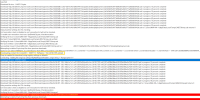
1768291666252.pngI have already verified Microsoft-related certificates and added them to the appropriate stores, but the error persists. I also confirmed with the firewall administrator that there is no interception or inspection of files or URLs or Proxy.
Has anyone else experienced this issue?
 
It is clearly a Cert error... Make sure that your server is update.
Sorry, I’m not entirely sure which certificates are required, so I only made sure that the previously downloaded CAB file contains the following certificates: Microsoft Root Certificate Authority 2010, Microsoft Root Certificate Authority 2011, and Microsoft Windows Code Signing PCA 2024.
 
Sorry, I’m not entirely sure which certificates are required, so I only made sure that the previously downloaded CAB file contains the following certificates: Microsoft Root Certificate Authority 2010, Microsoft Root Certificate Authority 2011, and Microsoft Windows Code Signing PCA 2024.
The server is also updated on a regular monthly basis.
 
Sorry, I’m not entirely sure which certificates are required, so I only made sure that the previously downloaded CAB file contains the following certificates: Microsoft Root Certificate Authority 2010, Microsoft Root Certificate Authority 2011, and Microsoft Windows Code Signing PCA 2024.
It will be the cert that was used to signed the file. You can see this by looking at signing details on the file and you will see that there is an issue. Most of the time it means that your server is no update the latest SU or that you can't see the Cert server.
 
It will be the cert that was used to signed the file. You can see this by looking at signing details on the file and you will see that there is an issue. Most of the time it means that your server is no update the latest SU or that you can't see the Cert server.
Monthly security updates are current and certificates have been verified. I compared this setup with a working SCCM server, and both configurations are identical.

As a temporary workaround, I'm manually updating the IsSigned flag to 0 in the SQL database for all .psf files in the update (e.g. update CI_Files set IsSigned=0 where FILENAME = 'Windows 11. 0-KB5074108-x64-baseless.psf' and FILENAME = 'ssu-26100.7295-x64.psf').

The downside is that I have to do this every month; I am still searching for a permanent fix or a more efficient solution. Do you have any recommendations?

Thanks.
 

Forum statistics

Threads
7,154
Messages
27,930
Members
18,230
Latest member
ThB
Back
Top