Forums on Intune, SCCM, and Windows 11

Welcome to the forums. Register a free account today to become a member! Once signed in, you'll be able to participate on this site by adding your topics and posts, as well as connect with other members through your own private inbox!

SOLVED OSDComputerName - Windows 11 Image

  • Thread starter Thread starter mattyb
  • Start date Start date
  • Replies Replies 1
  • Views Views 1K
Status
Not open for further replies.

mattyb

New Member
Messages
2
Solutions
1
Reaction score
1
Points
3
This is probably the dumbest question ever asked but im still new to SCCM and was hoping for some pointers. When are sccm environment was originally setup we used a windows 10 image and renaming worked perfectly fine. I recently changed to a windows 11 image and im still getting prompted to put in the Computer name during the beginning of the task sequence, but when it finishes the image it names it desktop-123213 some random sequence of numbers and letters. I have tried with the value of OSDComputerName and with none. Both ways prompt me and i get the same result at the end.
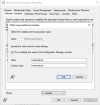
Screenshot 2025-02-27 at 11.30.41 AM.png
 
Solution
This is probably the dumbest question ever asked but im still new to SCCM and was hoping for some pointers. When are sccm environment was originally setup we used a windows 10 image and renaming worked perfectly fine. I recently changed to a windows 11 image and im still getting prompted to put in the Computer name during the beginning of the task sequence, but when it finishes the image it names it desktop-123213 some random sequence of numbers and letters. I have tried with the value of OSDComputerName and with none. Both ways prompt me and i get the same result at the end.

View attachment 6981


for now this script is working. I had to make sure that during the task sequence when it joins the computer to the domain i added a script to...
This is probably the dumbest question ever asked but im still new to SCCM and was hoping for some pointers. When are sccm environment was originally setup we used a windows 10 image and renaming worked perfectly fine. I recently changed to a windows 11 image and im still getting prompted to put in the Computer name during the beginning of the task sequence, but when it finishes the image it names it desktop-123213 some random sequence of numbers and letters. I have tried with the value of OSDComputerName and with none. Both ways prompt me and i get the same result at the end.

View attachment 6981


for now this script is working. I had to make sure that during the task sequence when it joins the computer to the domain i added a script to restart the computer. Im still not sure why the OSDComputerName under Unknown Computers isnt working.

cmd.exe /c start /wait cmd.exe /c PowerShell Start-Process powershell -Verb RunAs; $ts = New-Object -COMObject Microsoft.SMS.TSProgressUI; $ts.CloseProgessDialog(); $Creds = Get-Credential; $Input = Read-Host -Prompt 'Computer Name'; Write-Host 'Computer name will change to ' $Input; Read-Host -Prompt 'Press Enter'; Rename-Computer -NewName $Input -DomainCredential $Creds; Read-host -Prompt 'press enter'
 
Solution
Status
Not open for further replies.

Forum statistics

Threads
7,133
Messages
27,858
Members
18,151
Latest member
TonyGTR
Back
Top