Forums on Intune, SCCM, and Windows 11

Welcome to the forums. Register a free account today to become a member! Once signed in, you'll be able to participate on this site by adding your topics and posts, as well as connect with other members through your own private inbox!

PENDING No Management Point shown Task Sequence Media

rhinotechie

Member
Messages
21
Reaction score
1
Points
3
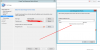
I'm using ConfigMgr 1910 and I know in the past that I have created a few bootable medias and can't remember what version it was working in and have updated a few times since then and just noticed yesterday when trying to create a bootable media that there was no MP showing up. I have attached a screenshot and if anyone has experienced this issue it would be greatly appreciated to share your resolve.
 

Attachments

  • Screenshot_723.png
    Screenshot_723.png
    53.8 KB · Views: 35
Cause: You will run into this issue if the Management Point is configured to use HTTPS and you are using the self-signed certificate and not importing the PKI certificate while creating the TS bootable media.

Resolution:

To fix this you will need to import the certificate on the Security page.

Certificate requirements:

  • Certificate Purpose: Client authentication
  • Template to use: Workstation Authentication
NOTE This certificate must be exported in a Public Key Certificate Standard (PKCS #12) format, and the password must be known so that it can be imported.
 
Back
Top