
I added three new applications for software metering, but unfortunately, I'm not getting any results. The existing applications are working fine.
I wanted to track the usage of our browsers, so I created metering rules for Edge, Chrome, and Firefox.
When checking the mtrmgr.log, I see the following error appearing repeatedly for these applications. Does anyone have an idea what might be causing this?
GetShortPathName failed for C:\Program Files\Mozilla Firefox\firefox.exe, error 5. GetFileVersionInfoSize failed for file C:\Program Files\Mozilla Firefox\firefox.exe, error 1812. Program might not match metering rules, as version header was not read.
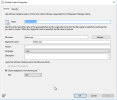
Example of my Firefox rule.
I wanted to track the usage of our browsers, so I created metering rules for Edge, Chrome, and Firefox.
When checking the mtrmgr.log, I see the following error appearing repeatedly for these applications. Does anyone have an idea what might be causing this?
GetShortPathName failed for C:\Program Files\Mozilla Firefox\firefox.exe, error 5. GetFileVersionInfoSize failed for file C:\Program Files\Mozilla Firefox\firefox.exe, error 1812. Program might not match metering rules, as version header was not read.
Example of my Firefox rule.

