Forums on Intune, SCCM, and Windows 11

Welcome to the forums. Register a free account today to become a member! Once signed in, you'll be able to participate on this site by adding your topics and posts, as well as connect with other members through your own private inbox!

PENDING New CMG installation issues error 500

  • Thread starter Thread starter ikkhatri
  • Start date Start date
  • Replies Replies 3
  • Views Views 10K

ikkhatri

Active Member
Messages
35
Solutions
2
Reaction score
3
Points
8
Hi Prajwal,

I followed your guide to configure CMG.

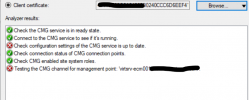
When running the CMG Connection Analyzer using AD user this is what I get:
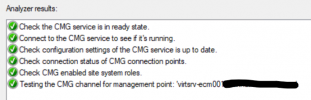
1650375171573.png

When running it using a client certificate, this is what I get:
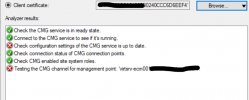
1650375253954.png

1650375502927.png

Running internal Root CA using a windows server vm.
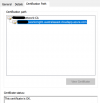
CMG Certificate:
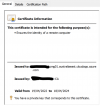
1650375603629.png
1650375685977.png

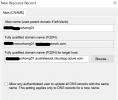
CNAME entry created in AD DNS:
1650375943532.png
Similarly I have created a CNAME entry with my external DNS provider: CMG01.activedirectorydomain.com pointing to CMG01.australiaeast.cloudapp.azure.com

Client Certificate:
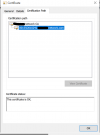
1650376249171.png
SMSAdminUI.log:
1650376355708.png

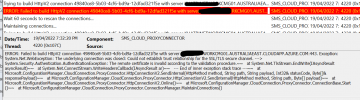
SMS_Cloud_ProxyConnector.log shows:
1650376572848.png
I have followed your CMG guide and the above is what I'm stuck at.
Additional info:
- CMG Connection Point has been installed.
- Client Device --> Config MGR --> General Tab shows intranet.
- NSlookup resolves the Service name: CMG01.australiaeast.cloudapp.azure.com with the public IP address assigned to the VM scale set.
- In the properties of the MP I have also selected:
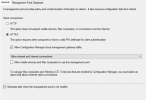
1650376860833.png
If there are any additional logs required please let me know and am happy to screenshot it.

Any assistance will be greatly appreciated.

Thank you
 
Last edited:
The configuration of CMG is correct, but it seems like the issue is with the certificate.
I am seeing two issues from the screenshots:
1. The remote certificate is invalid according to validation procedure
2. Remote server returned error 500

 
Thank you Prajwal, I have deleted the CMG and will reconfigure it again and have a good read at the link provided above. I will add the steps here for others once I am successful as this may help someone. :)
 
So after removing the CMG. I decided to to re-do my entire PKI setup.
- issued a certificate for my DP and imported it under DP properties.
- issued client certificates to computers via GPO
- Created a web server certificate and in IIS configured the https binding.
- Configured https on the DP and MP in properties for each.
- Ran a test to image a new machine = successful (using https)
- Ran a app deployment test = successful. (the content was distributed to the on-prem DP to see if my intranet clients work over https first = successful.
- Created a certificate for the CMG and configured CMG to use VM scale set as cloud services (classic) is now deprecated.
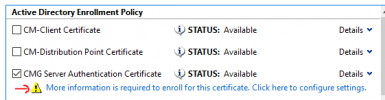
- For the CMG Certificate request after the webserver template was created I selected the below: (This is the certificate uploaded during the first stages of CMG configuration)
1650849966593.png
Common Name = CMG FQDN (IE: cmg01.region.cloudapp.azure.com)
DNS: ECM (SCCM) site server FQDN (IE: configmgrserver.local-ad-domain.com)
- Checked client settings and enabled Cloud services
- Added the CMG to the boundary group
- Configured the service connection point and selected the CMG service.
- Added the root CA to the CMG configuration.
- Went over your entire PKI setup, and CMG guide again to see if I didn't miss anything
- And finally added the CNAME entries in AD DNS and external dns provider (godaddy)
In DNS (AD):
- Added the Alias name as the cmg service name (IE: cmg01)
- FQDN: cmg01.region.cloudapp.azure.com (IE: cmg01.australiaeast.cloudapp.azure.com)
In External DNS provider (godaddy):
- Added a new entry for CNAME where name is your CMG name (IE: cmg01)
- Added the value as: FQDN: cmg01.region.cloudapp.azure.com (IE: cmg01.australiaeast.cloudapp.azure.com)

- Thereafter I removed the application from the on-prem DP and distributed the content to CMG only, and tried to install the app again so the content gets delivered from the CMG = successful

CMG Service functioning perfectly.

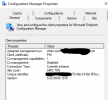
Screenshot of config mgr client
1650851382677.png
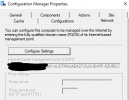
My internet based management point (FQDN) was automatically set:
1650851476997.png

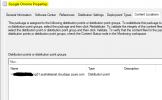
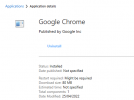
As you can see the google chrome app is only distributed to the cmg:
1650851249986.png
Google Chrome installed over CMG:
1650851089917.png
I am now curious about the following guide so that will be next:
https://www.prajwaldesai.com/deploy-task-sequence-over-internet-sccm-cmg/

Thank you.
 
Last edited:

Forum statistics

Threads
7,163
Messages
27,959
Members
18,251
Latest member
Twc

Trending content

Back
Top