Forums on Intune, SCCM, and Windows 11

Welcome to the forums. Register a free account today to become a member! Once signed in, you'll be able to participate on this site by adding your topics and posts, as well as connect with other members through your own private inbox!

SOLVED Multiple clients have error with CmRcService, unable to stop service

Status
Not open for further replies.

martin1963

Member
Messages
14
Solutions
1
Reaction score
0
Points
1
When I look at the Client check detail I see the following:

Verify/remediate configuration manager remote control startup type
Result: Internal Error
Result Code: 0x80070005 Access is denied

Verify/remediate configuration manager remote control service status
Result: Internal Error
Result Code: 0x80070005 Access is denied

The log on for the CmRcService is set to Log On As Local System.

This is for SCCM 2012 R2.

Does anyone know why I have all these errors? The clients are communicating to the server and getting patches and software updates.
 
Could you explain more about this issue ?. Also, open the ConfigMgr control panel applet and check the status of the "Remote Tools Agent" on the Components tab.
 
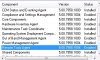
Remote tools agent is enabled, here is a screen shot of the version.

Here is also a screenshot of the client check detail error I get. Some of the error messages are new some are months old.

These errors are messing up the Endpoint Protection status screen. I have 832 computers but only 79 show up as active. When I check the virus defs most are up to date or only a few days behind.

Any insight into this would be greatly appreciated!

Oh and I upgrade all my computers to Office 2013 using your instructions, worked great. Thanks.


Config.JPG Capture.JPG Config.JPG Capture.JPG
 

Attachments

  • End point.JPG
    End point.JPG
    43.4 KB · Views: 16
I would say please check C:\windows\ccm\Logs\CmRcService.log about more error... and if you found below error message

Failed to open registry key Software\Microsoft\SMS\Client\Client Components\Remote Control\SessionStatus (0x80070005) for reading

Then, do the following steps using powershell,

$acl = (Get-ACL HKLM:\SOFTWARE\Microsoft\SMS)
$acl.Access
$acl.Sddl

check the status if its work or not :)
 
I would say please check C:\windows\ccm\Logs\CmRcService.log about more error... and if you found below error message

Failed to open registry key Software\Microsoft\SMS\Client\Client Components\Remote Control\SessionStatus (0x80070005) for reading

Then, do the following steps using powershell,

$acl = (Get-ACL HKLM:\SOFTWARE\Microsoft\SMS)
$acl.Access
$acl.Sddl

check the status if its work or not :)

I looked in the CmRcService logs and there are no errors. Beginning to think these might be false-positives or at the worst just a one time failure.
I wish I could clear the error off all the clients as it skews the monitoring results.
Thank you for the response.
 
@martin1963 - any update on this issue ?. was it false-positive as you mentioned ?

Some of the error messages were real, for instance some of the computers were turned off when they were queried by the server. Not sure about the other ones, but all computers are communicating to the SCCM server.
I am going to see if the SQL guy here can find the error messages and just clear them out.
If so I will post the results.
For now this can be resolved, thank you.
 
Status
Not open for further replies.

Forum statistics

Threads
7,130
Messages
27,846
Members
18,145
Latest member
Rothgar
Back
Top