Forums on Intune, SCCM, and Windows 11

Welcome to the forums. Register a free account today to become a member! Once signed in, you'll be able to participate on this site by adding your topics and posts, as well as connect with other members through your own private inbox!

SOLVED Most of the SCCM built-in reports are in blank

Status
Not open for further replies.

Gustavo

Member
Messages
21
Solutions
2
Reaction score
3
Points
3
Hi there,

I have installed reporting services but I get the most of the reports in blank, especially software reports. It seems it is only working hardware reports. I have read many documents advising not to use software inventory but it is for testing in a lab before SCCM is implemented in my company. In any case I have not found inside hardware reports, a report that lists computers by an specific software (very usefull for me in my current computers manager tool). Parameters list box are also empty in many of the reports, especially in software reports.

So, this is my configuration:
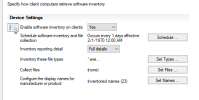
1611087246454.png

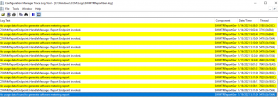
Client logs:
1611087444101.png
I am stuck and I really don't know what else to do or check. So I would appreciate any help.
Thanks in advance.
Gustavo
 
First off you DON'T want to enabled SW inventory!
Second, Which reports EXACTLY aren't working for you?
Third Software titles come from both AI and Hardware inventory. These are where you will find the most useful reports.
 
First off you DON'T want to enabled SW inventory!
Second, Which reports EXACTLY aren't working for you?
Third Software titles come from both AI and Hardware inventory. These are where you will find the most useful reports.
Hi Garth,

I was taking a look to your info and it is ok, let's forget about the software inventory. It was only for testing in the lab.
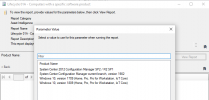
For example, in AI it does not work lifeycle 01A, I only have a few products in the parameter value box
1611173258731.png
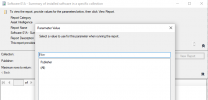
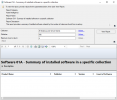
and Software 01A, no values in publisher parameter box and even selecting "all" i get a blank report
1611173380571.png

1611173405763.png
The same as above for report Software 02D - Computers with specific software installed. For me it is very usefull to have a report of computers with a specific software installed.
It seems that hardware reports are working right, I have also tried network and operating system reports and they are working right too.

Thx
 
Is AI enabled?

Keep in mind that for lifecycle reports only a few titles should be listed and ONLY microsoft titles too!
 
Is AI enabled?

Keep in mind that for lifecycle reports only a few titles should be listed and ONLY microsoft titles too!
Ok, I have enabled all the classes indicated in your document and I am going to setup Asset Intelligence Syncrhonization Point, I will see if it works and I will update you.

Thanks a lot Garth
 
Hi Garth,

It worked!!. I am getting now software reports. Thanks a lot for your valuable help. I owe you a beer if you come to Barcelona someday

BR
 
Status
Not open for further replies.

Forum statistics

Threads
7,133
Messages
27,858
Members
18,151
Latest member
TonyGTR
Back
Top