Forums on Intune, SCCM, and Windows 11

Welcome to the forums. Register a free account today to become a member! Once signed in, you'll be able to participate on this site by adding your topics and posts, as well as connect with other members through your own private inbox!

PENDING Library vs source files

  • Thread starter Thread starter Attilla
  • Start date Start date
  • Replies Replies 1
  • Views Views 740

Attilla

New Member
Messages
2
Reaction score
0
Points
1
I have been in charge of sccm for some time but still learning every day. Challenge is that we have a disk that we have to move which is source files. (Located on network share)
As I understand this can be done using Content Library Transfer tool or am I wrong ?
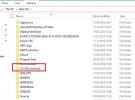
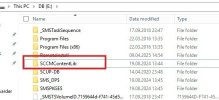
What I do not understand , it seems that content library is present on both d: and e: (attached)
The network share is just for the sources
How do I move the source files to a different location without disrupting the system ?
 

Attachments

  • sccme.jpg
    sccme.jpg
    31.8 KB · Views: 0
  • sccmd.jpg
    sccmd.jpg
    51.7 KB · Views: 0
This is a good opportunity to move both and i did this a couple of years ago, but it can be normal for sccm to split the CL if disk space becomes an issue. Once you move your Sources to a central location it will also help with future migrations. Just make sure that all the unc paths in your packages are updated to the new location, there are some great scripts for that on various websites.
 

Forum statistics

Threads
7,126
Messages
27,829
Members
18,139
Latest member
KumarGourav

Latest posts

Trending content

Back
Top