Forums on Intune, SCCM, and Windows 11

Welcome to the forums. Register a free account today to become a member! Once signed in, you'll be able to participate on this site by adding your topics and posts, as well as connect with other members through your own private inbox!

PENDING Keyword search doesnt work for applications in Software Center

sax

Member
Messages
11
Reaction score
0
Points
1
MCM (SCCM) 2403

it seems that searching for keywords (set for application in Software Center) seems to be broken in our environment

if i add "abcxyz" to an application as keyword it could not be found via Software Center but if i add it the localized description the application could be found

checked applications XML file in C:\Windows\CCM\CIDownloader\DigestStore and they keyword is mentioned there, so it should be viewable to the Softwarecenter - it looks like its not searching for it - this problem seems to be general problem in our environment

Any ideas here?
 
MCM (SCCM) 2403

it seems that searching for keywords (set for application in Software Center) seems to be broken in our environment

if i add "abcxyz" to an application as keyword it could not be found via Software Center but if i add it the localized description the application could be found

checked applications XML file in C:\Windows\CCM\CIDownloader\DigestStore and they keyword is mentioned there, so it should be viewable to the Softwarecenter - it looks like its not searching for it - this problem seems to be general problem in our environment

Any ideas here?
I am going to test this. Can you confirm whether you're searching for a text that appears in the application name or it's description?
 
i find it if i search for something which is in description and/or application name but i dont find it if its set as keyword
 
but it shouldnt matter whether its appears in application name, description or keyword. It should be found in all ways as long as this application is deployed to the device or user
 
but it shouldnt matter whether its appears in application name, description or keyword. It should be found in all ways as long as this application is deployed to the device or user
Can you give the exact term that you're trying to search for and unable to find it in apps? I will test this in my lab.
 
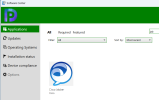
Searching for Microsoft in the software center shows all the apps that have Microsoft in their names. The Notepad++ also appears in the search results because the term "Microsoft" is included in the app description and not in the name.

1722269659578.png
 
yes, searching for words which are included in application name or description also works here but not if they are under keywords.

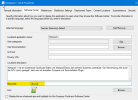
Put "abcxyz" to notepad++ keywords and do a policy refresh and search for it in Software Center, if it works for you then its fine but i need to know why its not working for me

5rQDoF1OCO.png
 
yes, searching for words which are included in application name or description also works here but not if they are under keywords.

Put "abcxyz" to notepad++ keywords and do a policy refresh and search for it in Software Center, if it works for you then its fine but i need to know why its not working for me

View attachment 6378
Where is it mentioned in the MS documentation that those keywords appear in the software center search results?
 
I thought that was the idea behind it and I have learnt from a confirmed source that it works exactly the same way elsewhere
 
If you are told by a reliable source that it works, you should check with them to find out why it is not working in your case.
 
I thought that was the idea behind it and I have learnt from a confirmed source that it works exactly the same way elsewhere
Here Microsoft Says:
  • Keywords: Enter a list of keywords in the selected language. These keywords help Software Center users search for the application.

I don't understand how i can enable users to search for applications without knowing exactly how its named.
 
I don't understand how i can enable users to search for applications without knowing exactly how its named.
its an addition to the application name for example you have VLC in Software Center. Users can search for VLC and will find it but you can add keywords like media, player, video and so on and if users search for it they will find VLC too.
 
Search will find words in application name, description and keywords. In theory :) At my MECM/SCCM it will only find words in application name and description but not any keyword.
 
its an addition to the application name for example you have VLC in Software Center. Users can search for VLC and will find it but you can add keywords like media, player, video and so on and if users search for it they will find VLC too.
This does not work in my case.
i cant find applications based on keywords...
i entered "lol" in the keyword section, cant find any lol application
 
Search will find words in application name, description and keywords. In theory :) At my MECM/SCCM it will only find words in application name and description but not any keyword.
but do you then add "keywords" to the description of the Applications like "media player"?
 
but do you then add "keywords" to the description of the Applications like "media player"?
thats an option which works but i always wanted to unterstand why keywords are not working but Prajwald doesnt seems to be interested to test it

>i entered "lol" in the keyword section, cant find any lol application
but application is deployed and you see it in Software Center and also the latest revision?
 
Back
Top