Forums on Intune, SCCM, and Windows 11

Welcome to the forums. Register a free account today to become a member! Once signed in, you'll be able to participate on this site by adding your topics and posts, as well as connect with other members through your own private inbox!

PENDING KB5000800 & KB5000853 installation failed

ramniwasyadav0

Active Member
Messages
36
Reaction score
1
Points
8
Hi All,
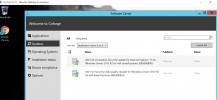
I am unable to install these two (KB5000800 & KB5000853) in win sever 2012 R2. i have done below steps.
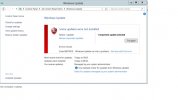
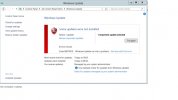
reinstall sccm client , rename (catroot2, distribution folder, registory.pol) manual updates download installation and dism command but unable to installed these. i have also try to windows updates from control panel & get one imp update (KB5000848) but not showing these (KB5000800 & KB5000853). i have try to install imp update but unable to install via control panel getting error code 800703f9. unable to install this manual as well as command also.
please find the attached screen short and give solution. i will really appreciate your response.
 

Attachments

  • kb5000800.png
    kb5000800.png
    140.3 KB · Views: 7
  • errorcode.jpg
    errorcode.jpg
    81.2 KB · Views: 6
Try to download the latest Servicing Stuck Update from Microsoft Catalog, install it and restart the server. Once done, try to install the above software update from the Software Center and check the result.

If still the same issue, you have to check the client log files to get more details.
 
Try to download the latest Servicing Stuck Update from Microsoft Catalog, install it and restart the server. Once done, try to install the above software update from the Software Center and check the result.

If still the same issue, you have to check the client log files to get more details.
Hi saad,
As per your conversion. i have try to install latest servicing stuck update (2021-04 Servicing Stack Update for Windows Server 2012 R2 for x64-based Systems (KB5001403)) getting error this updates is not applicable for your system. & not able to install manual updates also.
can you tell me which log you have require to troubleshooting.
 
Are you able to install the Tuesday updates for this month? If you have any third-party AV or Firewall, try to disable it temporarily.

You can start the troubleshoot from the Event Viewer, WindowsUpdate.log, UpdatesDeployment.log, WUAHandler.log etc.
 
Are you able to install the Tuesday updates for this month? If you have any third-party AV or Firewall, try to disable it temporarily.

You can start the troubleshoot from the Event Viewer, WindowsUpdate.log, UpdatesDeployment.log, WUAHandler.log etc.
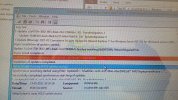
there is not servicing stuck update of current month for windows server 2012 R2. i am sharing wuahandler.log, cbs.log & manual updates error code screenshot.
 

Attachments

  • errorcode.jpg
    errorcode.jpg
    81.2 KB · Views: 1
  • photo6120946138107456690.jpg
    photo6120946138107456690.jpg
    291.1 KB · Views: 1
  • photo6120946138107456764.jpg
    photo6120946138107456764.jpg
    67 KB · Views: 1
The log file screenshots aren't clearly visible (atleast the important ones). Can you upload the log files instead.
 
Try to run the following commands and check again the WUAHandler.log and "C:\Windows\WindowsUpdate.log" for verification.
net stop wuauserv
del c:\windows\SoftwareDistribution /q /s
net start wuauserv
 
after using above given command . updates status showing installed & removed from software center. but KB number not showing in view installed updates. & after few hours update appear again.
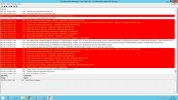
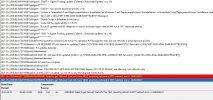
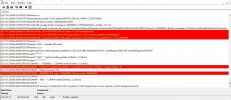
plz find the 2 screenshots of windows update log
 

Attachments

  • WindowsUpdatelog.jpg
    WindowsUpdatelog.jpg
    233.8 KB · Views: 2
  • WindowsUpdatelog1.jpg
    WindowsUpdatelog1.jpg
    162.9 KB · Views: 1

Forum statistics

Threads
7,171
Messages
27,990
Members
18,297
Latest member
Kahnrym

Trending content

Back
Top