Darshan Patel
Member
- Messages
- 7
- Reaction score
- 2
- Points
- 3
Windows 10 1709 x64 machines are showing a compliance status of "Update is not required" for "2018-06 Cumulative Update for Windows 10 Version 1709 for x64-based Systems (KB4284819)"
On client side Windows Update showing below mesg.
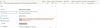
Your Device is at risk because its out of date and missing importance security and quality updates.
Find attach screen shot for you reference.
PS:
installed above KB manually on my system and it works for me. after Restart its not showing any warning mesg.
On client side Windows Update showing below mesg.
Your Device is at risk because its out of date and missing importance security and quality updates.
Find attach screen shot for you reference.
PS:
installed above KB manually on my system and it works for me. after Restart its not showing any warning mesg.