Hello,
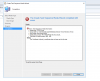
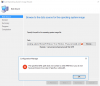
First time setting up and managing an SCCM server. My current setup is SCCM 2016 and SQL server 2017. I am having an issue with setting up my first operating system on SCCM 2016. The error I am having is that when I set the UNC path it says that there is issues with permissions or no operating system. The operating system ISO is on a shared server which I have full read/write access. I cannot use the ISO if I put it on the local machine. Here's what I have done so far:
*Reinstall SCCM 2016
*Reinstall SQL Server 2017
*made sure updates are up to date
*Downloaded different version of the same operating system(Windows 10)
I have looked into seeing how I could address it and some people have stated that I need a .wim file in the Windows 10 ISO. I found a converter online to modify the file from install.bin to install.win. Put the file in the same folder that the install.bin file was. No success. Please help me...
Please pardon my lack of experience I just started using SCCM about a few months ago.
First time setting up and managing an SCCM server. My current setup is SCCM 2016 and SQL server 2017. I am having an issue with setting up my first operating system on SCCM 2016. The error I am having is that when I set the UNC path it says that there is issues with permissions or no operating system. The operating system ISO is on a shared server which I have full read/write access. I cannot use the ISO if I put it on the local machine. Here's what I have done so far:
*Reinstall SCCM 2016
*Reinstall SQL Server 2017
*made sure updates are up to date
*Downloaded different version of the same operating system(Windows 10)
I have looked into seeing how I could address it and some people have stated that I need a .wim file in the Windows 10 ISO. I found a converter online to modify the file from install.bin to install.win. Put the file in the same folder that the install.bin file was. No success. Please help me...
Please pardon my lack of experience I just started using SCCM about a few months ago.
Attachments
Last edited: