Forums on Intune, SCCM, and Windows 11

Welcome to the forums. Register a free account today to become a member! Once signed in, you'll be able to participate on this site by adding your topics and posts, as well as connect with other members through your own private inbox!

SOLVED Is it possible to have 2 security roles?

  • Thread starter Thread starter TechLoic
  • Start date Start date
  • Replies Replies 6
  • Views Views 918

TechLoic

Member
Messages
7
Reaction score
0
Points
1
Hello the Team,
I'm deploying MCM at my job, and I'm stuck with an issue. I would like to know if it's possible to set up the following:
- 1 security role that mostly has read-only rights
- 1 security role that has full rights to do almost everything
I have also created 2 security scopes to limit certain access permissions.
My problem is that when I assign myself both security roles with different security scopes, I am still able to make changes in zones where I'm supposed to have read-only access. I hope I'm explaining this clearly.
Basically, my question is: is it possible to have 2 security roles simultaneously? One where I would be limited, and another one where I would have more access, all of it with only 1 account.
Thank you for your help.
 
Hello the Team,
I'm deploying MCM at my job, and I'm stuck with an issue. I would like to know if it's possible to set up the following:
- 1 security role that mostly has read-only rights
- 1 security role that has full rights to do almost everything
I have also created 2 security scopes to limit certain access permissions.
My problem is that when I assign myself both security roles with different security scopes, I am still able to make changes in zones where I'm supposed to have read-only access. I hope I'm explaining this clearly.
Basically, my question is: is it possible to have 2 security roles simultaneously? One where I would be limited, and another one where I would have more access, all of it with only 1 account.
Thank you for your help.
Can you give an example of what you can change that you don't think you should be able too?
 
Hello, thank you for your response, here's (I hope) a clearer description of my question.

The technicians:

- James PARKER (TEAM A)
- Barbara HAND (TEAM A)
- Patrick FOSTER (TEAM B)
- Teresa HOLMES (TEAM B)

The security roles:
- Technician read-only (cutom role with the "read" and "run repport" permissions)
- Technician (custom role that has the permissions to "read", "modify", "delete", "create", "run repport", "modify report")

The security scopes:
- SS COMMON
- SS TEAM A
- SS TEAM B

The collections (folders):
.Device Collections
...|_ COMMON (with the security scopes "SS COMMON")
...|_ TEAM A (with the security scopes "SS TEAM A")
...|_ TEAM B (with the security scopes "SS TEAM B")

The structure (folders):
.Application Management
...|_ Applications
......|_ COMMON (with the security scopes "SS COMMON")
......|_ TEAM A (with the security scopes "SS TEAM A")
......|_ TEAM B (with the security scopes "SS TEAM B")

=> The wish is the following:

- All technicians (James PARKER, Barbara HAND, Patrick FOSTER, Teresa HOLMES) should have the security roles "Technician read-only" and "Technician"
- The security role "Technician read-only" is associated with the security scope "SS COMMON" and the collection "Collection COMMON"
- The security role "Technician" is associated with the security scope "SS TEAM A" and "SS TEAM B" as well as the collections "Collection TEAM A" and "Collection TEAM B"

I would like all technicians to have limited access to the "COMMON" section (the "read-only" permission) and more rights in "TEAM A" and "TEAM B" (the "read," "modify," "delete," "create," "run report," and "modify report" permissions).
 
Hello, thank you for your response, here's (I hope) a clearer description of my question.

The technicians:

- James PARKER (TEAM A)
- Barbara HAND (TEAM A)
- Patrick FOSTER (TEAM B)
- Teresa HOLMES (TEAM B)

The security roles:
- Technician read-only (cutom role with the "read" and "run repport" permissions)
- Technician (custom role that has the permissions to "read", "modify", "delete", "create", "run repport", "modify report")

The security scopes:
- SS COMMON
- SS TEAM A
- SS TEAM B

The collections (folders):
.Device Collections
...|_ COMMON (with the security scopes "SS COMMON")
...|_ TEAM A (with the security scopes "SS TEAM A")
...|_ TEAM B (with the security scopes "SS TEAM B")

The structure (folders):
.Application Management
...|_ Applications
......|_ COMMON (with the security scopes "SS COMMON")
......|_ TEAM A (with the security scopes "SS TEAM A")
......|_ TEAM B (with the security scopes "SS TEAM B")

=> The wish is the following:

- All technicians (James PARKER, Barbara HAND, Patrick FOSTER, Teresa HOLMES) should have the security roles "Technician read-only" and "Technician"
- The security role "Technician read-only" is associated with the security scope "SS COMMON" and the collection "Collection COMMON"
- The security role "Technician" is associated with the security scope "SS TEAM A" and "SS TEAM B" as well as the collections "Collection TEAM A" and "Collection TEAM B"

I would like all technicians to have limited access to the "COMMON" section (the "read-only" permission) and more rights in "TEAM A" and "TEAM B" (the "read," "modify," "delete," "create," "run report," and "modify report" permissions).
That sounds doable, what isn't working for you? Why are you assigning Technician to common collection if you want them to have read only rights?
 
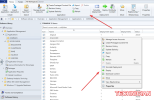
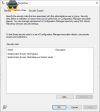
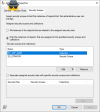
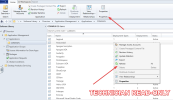
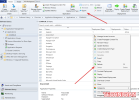
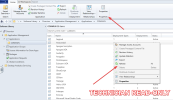
The main problem I encounter is that when a technician has only the "Technician Read-Only" security role, the permissions are correctly limited on the "COMMON" folder, as intended. However, when I add the "Technician" security role in addition (for the other folders), the user gains access to more options that I wanted to hide (on the right-click and the top ribbon as shown on the screenshots).

Here are some screenshots that illustrate my problem:
(some text is in French; "Gestionnaire de parc informatique" translates to "Technician" and "Gestionnaire de parc informatique en lecture seule" translates to "Technician Read-Only")

NYYNfEiPuW.png
I1F1YPzK4c.png
jH9gfFtrSV.png
ihJaiiKg3q.png

Does this help? Let me know if you need more information, and thank you for your assistance!
 

Attachments

  • NYYNfEiPuW.png
    NYYNfEiPuW.png
    111.5 KB · Views: 1
  • UWDHeVTVlP.png
    UWDHeVTVlP.png
    147.5 KB · Views: 3
Last edited:
The main problem I encounter is that when a technician has only the "Technician Read-Only" security role, the permissions are correctly limited on the "COMMON" folder, as intended. However, when I add the "Technician" security role in addition (for the other folders), the user gains access to more options that I wanted to hide (on the right-click and the top ribbon as shown on the screenshots).

Here are some screenshots that illustrate my problem:
(some text is in French; "Gestionnaire de parc informatique" translates to "Technician" and "Gestionnaire de parc informatique en lecture seule" translates to "Technician Read-Only")

View attachment 6911
View attachment 6916
View attachment 6913
View attachment 6914

Does this help? Let me know if you need more information, and thank you for your assistance!
Ignoring the menu option, can they deploy apps to collections that they shouldn't?
 
Hello,
Seems no. However, after doing a bit of digging, I believe I found where my configuration was "wrong."
Now, everything seems to be okay except for the "move" permission. If I disable it, our technicians won't be able to copy packages anymore. Is this normal?
 
Back
Top