Forums on Intune, SCCM, and Windows 11

Welcome to the forums. Register a free account today to become a member! Once signed in, you'll be able to participate on this site by adding your topics and posts, as well as connect with other members through your own private inbox!
SOLVED Intune Kiosk mode (Windows 10) - Auto logging is not working.

  • Thread starter Thread starter MJ-Tech
  • Start date Start date
  • Replies Replies 4
  • Views Views 21K

MJ-Tech

Well-Known Member
Messages
217
Solutions
25
Reaction score
21
Points
18

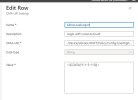
As per technical forum, created a custom configuration policy in Intune for autologon,​

i.e.,
  1. OMA-URI: ./Device/Vendor/MSFT/Policy/Config/UserRights/AllowLocalLogOn
  2. Data type: String
  3. Value: <![CDATA[Local account]]>
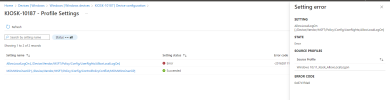
Observed that, policy is creating the kioskuser0 (local account) account but fails to configure autologon. i.e., Whenever system reboots, it is getting stuck with a login screen where we need to enter the username and password manually.

1669026901675.png

Any assistance please?​

 
For testing, Changed the Autologon value from <!CDATA[*S-1-5-113]]> to <![CDATA[Local account]]> . No update yet.

Is there any way that I can force sync this policy?

The status of the change seems to be pending for a long time.
 

Forum statistics

Threads
7,133
Messages
27,858
Members
18,151
Latest member
TonyGTR
Back
Top