Forums on Intune, SCCM, and Windows 11

Welcome to the forums. Register a free account today to become a member! Once signed in, you'll be able to participate on this site by adding your topics and posts, as well as connect with other members through your own private inbox!

SOLVED Insufficient permissions in software center

  • Thread starter Thread starter rob287
  • Start date Start date
  • Replies Replies 7
  • Views Views 2K
Status
Not open for further replies.

rob287

Active Member
Messages
38
Solutions
2
Reaction score
2
Points
8
But on the console on the client settings. I have selected

Install Permissions - All users
 
Hello

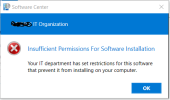
For users installing software on the software centre, you click install (patches or an app) and you get error insufficient permissions to do so.

Something to do with being local admin?
 
Hello

For users installing software on the software centre, you click install (patches or an app) and you get error insufficient permissions to do so.

Something to do with being local admin?
How did you setup the deployment? Is it every deployment? have you reviewed the logs? What troubleshooting have you done? Is it a app or program?
 
How did you setup the deployment? Is it every deployment? have you reviewed the logs? What troubleshooting have you done? Is it a app or program?
Every deployment App/program/patching.

They are dell wyse clients and have a write filter applied so im thinking it may be a dell issue not giving me access rather than SCCM.
 
Status
Not open for further replies.

Forum statistics

Threads
7,133
Messages
27,858
Members
18,151
Latest member
TonyGTR
Back
Top