Forums on Intune, SCCM, and Windows 11

Welcome to the forums. Register a free account today to become a member! Once signed in, you'll be able to participate on this site by adding your topics and posts, as well as connect with other members through your own private inbox!

SOLVED Insufficent Permission for Software Installation

Status
Not open for further replies.

vin418

Active Member
Messages
29
Reaction score
3
Points
3
Hi All,

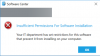
Do any one has idea about this error. in one of the users we were able to see this error when they try to install the Software through Software center.
Same error for all the applications.
Ran gpupdate no success.
But when logged in using Admin privileges no issues where detected.
Deleted SMSCFG file also still no success.
Do any one have any idea how i can resolve.
 
Hi All,

Do any one has idea about this error. in one of the users we were able to see this error when they try to install the Software through Software center.
Same error for all the applications.
Ran gpupdate no success.
But when logged in using Admin privileges no issues where detected.
Deleted SMSCFG file also still no success.
Do any one have any idea how i can resolve.
Can you add more details and attach some screenshot of the issues that you mentioned.
 
How exactly did you deploy the software?
Hi Garth,

Apologize for late response.
The Software was deployed as user based and other software as system based.
However we have asked other normal account user to login to the same machine and check, they also receive the same error in software center.
Same application is getting installed in other devices also, without any issue.
 
[/QUOTE]
Can you add more details and attach some screenshot of the issues that you mentioned.

This is the only error that we get while installing any application, no matter if it's office or SmartView or any other. Is there any log that we need to check for this.
1582004485631.png
 
Hi Garth,

Apologize for late response.
The Software was deployed as user based and other software as system based.
However we have asked other normal account user to login to the same machine and check, they also receive the same error in software center.
Same application is getting installed in other devices also, without any issue.
So if you deploy it as a user then the user themselves doesn't have access to install it. Therefore you should install it using the admin option.
 
Status
Not open for further replies.

Forum statistics

Threads
7,133
Messages
27,858
Members
18,151
Latest member
TonyGTR
Back
Top