Forums on Intune, SCCM, and Windows 11

Welcome to the forums. Register a free account today to become a member! Once signed in, you'll be able to participate on this site by adding your topics and posts, as well as connect with other members through your own private inbox!

SOLVED Install Software Updates during OSD Task Sequence

  • Thread starter Thread starter micdam
  • Start date Start date
  • Replies Replies 3
  • Views Views 23K

micdam

Well-Known Member
Messages
99
Reaction score
1
Points
8
I have a question about the “Install Software Updates” task in a Task Sequence. There are two options which you can select in the task, namely “Required for installation – Mandatory software updates only” and “Available for installation – All software updates”. What do these options mean? Does the first option mean that all the required updates for the concerning OS will be installed? And does the second option mean it will only install the updates deployed to a collection?
Hava i to create aa adr-sug and deployment to unknown computers?

can someone explain to me how it works?


Thanks
 

Here it goes.....​

1.Required for installation - Mandatory software updates only.​

This will install only updates that are deployed to this machine that are required, additional updates will not be applied.
2.Available for installation - All software updates
This will install any updates that are set to available and are deployed to the machine.

if you are deploying to unknown machines-In order for clients to install updates they must be deployed to them. As that applies to devices running OSD task sequences it means deploying to the two unknown computer objects. The easiest way to do that is to use the ‘All Unknown Computers’ collection
 

Here it goes.....​

1.Required for installation - Mandatory software updates only.​

This will install only updates that are deployed to this machine that are required, additional updates will not be applied.
2.Available for installation - All software updates
This will install any updates that are set to available and are deployed to the machine.

if you are deploying to unknown machines-In order for clients to install updates they must be deployed to them. As that applies to devices running OSD task sequences it means deploying to the two unknown computer objects. The easiest way to do that is to use the ‘All Unknown Computers’ collection
Thankyou

i tried to do it but it didn't work.
these are the steps:
1) i add the "Install software updates" step to the task sequence as displayed in ht image below:
1623057686078.png
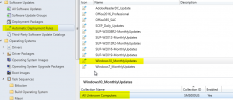
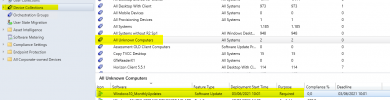
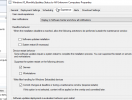
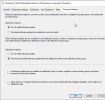
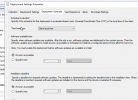
2) i deployed the updates to "unknown Computers" as displayed:
1623057819630.png

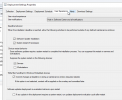
1623058089941.png
1623058129540.png
1623058189368.png

BUT it doesn't work
this is the error:

07/06/2021 10:44,24,Install Software Updates,Setup Operating System,The task sequence execution engine failed executing an action,11135,-2.145.107.952,... pdates​

Evaluating software updates from cached scan results​

Registry key HKEY_LOCAL_MACHINE\SOFTWARE\Policies\Microsoft\Windows\WindowsUpdate exists​

GetIPriviledgedInstallInterface successful​

Refreshing Updates​

Successfully initiated RefreshUpdates operation. For troubleshooting, please refer to logs: UpdatesDeployment.log, UpdatesHandler.log, UpdatesStore.log, wuahandler.log, WindowsUpdate.log​

Waiting for RefreshUpdates complete notification from Updates Deployment Agent​

Notification received,RefreshUpdates have been completed​

Signaled RefreshComplete notification​

Received RefreshUpdates complete notification from Updates Deployment Agent​

RefreshUpdates operation has been completed, hr=0x80244010​

RefreshUpdates(bForceOnlineScan), HRESULT=80244010 (installswupdate.cpp,1001)​

InstallUpdates(pInstallUpdate, tType, sJobID, sActiveRequestHandle), HRESULT=80244010 (main.cpp,248)​

Setting TSEnv variable SMSTSInstallUpdateJobGUID=​

Process(pInstallUpdate, tType), HRESULT=80244010 (main.cpp,310)​


Attachments

  • 1623057894661.png
    1623057894661.png
    27.3 KB · Views: 112
  • 1623057921152.png
    1623057921152.png
    26.4 KB · Views: 124
i splvedthe problem adding 7 times the step "install Software updates " to the ts as suggested " in a post on web
 

Forum statistics

Threads
7,171
Messages
27,990
Members
18,297
Latest member
Kahnrym

Trending content

Back
Top