Forums on Intune, SCCM, and Windows 11

Welcome to the forums. Register a free account today to become a member! Once signed in, you'll be able to participate on this site by adding your topics and posts, as well as connect with other members through your own private inbox!

SOLVED Install fails with exit code 0x87D00324

  • Thread starter Thread starter pcb
  • Start date Start date
  • Replies Replies 1
  • Views Views 5K
Status
Not open for further replies.

pcb

Well-Known Member
Messages
45
Solutions
2
Reaction score
0
Points
6
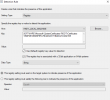
Hello, we are trying to install a certificate update to an application. The updater creates this registry key during install: HKEY_LOCAL_MACHINE\SOFTWARE\Microsoft\SystemCertificates\ROOT\Certificates\950F6E106509FEFA79C403A9171B4DC21D2347DE -- The install works, but the application isn't detected and I'm not sure why. I have set the detection method like this:
1650038276871.png

I have tried this just about every way it can be configured except creating a script for detection - There is a default key that has no value set, but that is not detected, even though it is there. I have tried unchecking this box and the 32bit application box to detect just the main key and that doesn't work. There is only one more key called "blob" but it is Reg_Binary and MECM says it is not supported. Is there something I am missing or is it necessary to create a script to detect a registry key?
 
Solution
Hello, we are trying to install a certificate update to an application. The updater creates this registry key during install: HKEY_LOCAL_MACHINE\SOFTWARE\Microsoft\SystemCertificates\ROOT\Certificates\950F6E106509FEFA79C403A9171B4DC21D2347DE -- The install works, but the application isn't detected and I'm not sure why. I have set the detection method like this:
View attachment 4437

I have tried this just about every way it can be configured except creating a script for detection - There is a default key that has no value set, but that is not detected, even though it is there. I have tried unchecking this box and the 32bit application box to detect just the main key and that doesn't work. There is only one more key called "blob" but it...
Hello, we are trying to install a certificate update to an application. The updater creates this registry key during install: HKEY_LOCAL_MACHINE\SOFTWARE\Microsoft\SystemCertificates\ROOT\Certificates\950F6E106509FEFA79C403A9171B4DC21D2347DE -- The install works, but the application isn't detected and I'm not sure why. I have set the detection method like this:
View attachment 4437

I have tried this just about every way it can be configured except creating a script for detection - There is a default key that has no value set, but that is not detected, even though it is there. I have tried unchecking this box and the 32bit application box to detect just the main key and that doesn't work. There is only one more key called "blob" but it is Reg_Binary and MECM says it is not supported. Is there something I am missing or is it necessary to create a script to detect a registry key?
ok... not sure what is going on. This failed repeatedly over a couple days, but as I was posting this apparently it installed and was detected. Literally as I hit post, I looked over and saw: Status: Installed.
 
Solution
Status
Not open for further replies.

Forum statistics

Threads
7,164
Messages
27,964
Members
18,257
Latest member
sujata

Trending content

Back
Top