Forums on Intune, SCCM, and Windows 11

Welcome to the forums. Register a free account today to become a member! Once signed in, you'll be able to participate on this site by adding your topics and posts, as well as connect with other members through your own private inbox!

PENDING Imaging with two Drives

Windows4life

New Member
Messages
3
Reaction score
0
Points
1
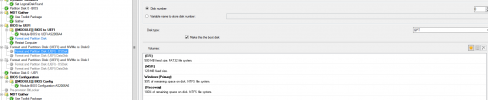
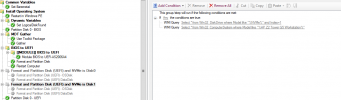
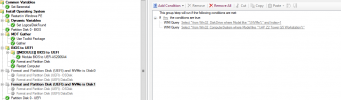
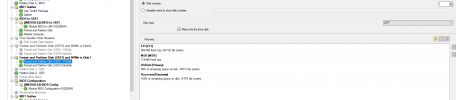
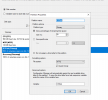
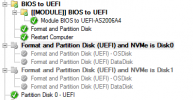
Hello all, i am hoping that some one can help me. I have a particular computer model HP Z2 G5 Workstation with two drives in it. One of them is NVMe and another is SSD. Originally this computer was set up as using RAID which i disabled, now i have two drives. The problem is that our imaging TS is set up where drive 0 is primary drive where TS drops the wim and makes it main drive. Configuration on this computer is completely backwards. NVMe which is 2TB and i want to make it primary os drive registers as drive 1, and SSD which is 7TB registers as drive 0. So naturally TS drops OS on the 7TB drive. i have added the following steps to my TS with hopes that it would solve the issue, however its still doing the same thing.
1651692396888.png
1651692408422.png1651692426258.png
1651692437723.png

1651692445799.png
1651692454757.png
1651692462365.png
1651692472314.png
1651692481227.png
 
Hi,
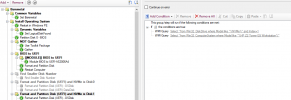
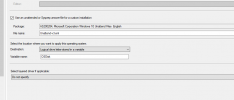
you calling both disks "OSDisk" which is the variable you use to till the WIM file to apply the windows image. you should call the one you want OSDisk and on your windows image use the variable.
 

Attachments

  • Capture.PNG
    Capture.PNG
    4.2 KB · Views: 14
This is what i have now.
 

Attachments

  • 2022-05-13_14-00-37.png
    2022-05-13_14-00-37.png
    74.8 KB · Views: 20
  • 2022-05-13_14-03-06.png
    2022-05-13_14-03-06.png
    75.4 KB · Views: 21
  • 2022-05-13_14-03-27.png
    2022-05-13_14-03-27.png
    29.9 KB · Views: 18
  • 2022-05-13_14-03-52.png
    2022-05-13_14-03-52.png
    15.8 KB · Views: 20

Forum statistics

Threads
7,162
Messages
27,953
Members
18,246
Latest member
neonlline

Latest posts

Trending content

Back
Top