Forums on Intune, SCCM, and Windows 11

Welcome to the forums. Register a free account today to become a member! Once signed in, you'll be able to participate on this site by adding your topics and posts, as well as connect with other members through your own private inbox!

PENDING How to uninstall Skype for Business Basic 2016

divvela raja

New Member
Messages
4
Reaction score
0
Points
1
I tried to uninstall Skype for business basic 2016 file through command using "C:\Program Files (x86)\Common Files\Microsoft Shared\OFFICE16\Office Setup Controller\setup.exe" /uninstall LYNCENTRY /dll OSETUP.DLL but it's not working please help me how to uninstall through sccm.
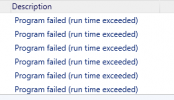
1608261522800.png
 
The last time I tried to uninstall Skype, I was unsuccessful. I will try few steps again in my lab and see if it works. Until then I will let others respond.
 
I tried to uninstall Skype for business basic 2016 file through command using "C:\Program Files (x86)\Common Files\Microsoft Shared\OFFICE16\Office Setup Controller\setup.exe" /uninstall LYNCENTRY /dll OSETUP.DLL but it's not working please help me how to uninstall through sccm.

View attachment 3268
Program Exceeded, generally means that there is a prompt that that is "displayed" to the user and is waiting for input. If this is running hidden the user can't see it.
 

Forum statistics

Threads
7,159
Messages
27,945
Members
18,241
Latest member
ljrb

Latest posts

Back
Top