Forums on Intune, SCCM, and Windows 11

Welcome to the forums. Register a free account today to become a member! Once signed in, you'll be able to participate on this site by adding your topics and posts, as well as connect with other members through your own private inbox!

SOLVED How to successfully remove aged clients from All System Colletions

Manuel

Well-Known Member
Messages
301
Reaction score
8
Points
18
Hi to All

Does anyone know a truly procedure from maintenance task used for deleting aged (obsolete) records from site database of SCCM 2012?

There is plenty of information in several web pages that talk about it, but none of them seems to be working quite well when I have applied on my server.

I would like to update membership from All Systems collection and see the number decrease but I can not happen

Please any help will be appreciated

Thanks in advanced

Manuel
 
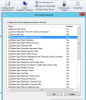
Each Configuration Manager site supports maintenance tasks that help maintain the operational efficiency of the Configuration Manager database. By default, several maintenance tasks are enabled in each site, and all tasks support independent schedules. Open the CM Console >Administration > Site Configuration > Sites. Click Home tab > click Site Maintenance.

upload_2015-11-2_11-59-21.png
 
Yeah!, I found them before I put my question in this forum.

My concern is which is the maintenance task that I have to enable or check the schedule in order to see my number of devices from All Systems collection decreases because I have removed a bunch of computers accounts from Active Directory but I could not see any change in the number of devices in All Systems collection

Thanks in advance

Manuel
 
Hi to all again


Allow me to tell you that I edit Delete Inactive Client Discovery Data and typed a lower number of days, pushed apply bottom and update all Systems collections. For now, it appears to work quite well.

Manuel
 
how do I force SCCM to install program or application to a pc/laptop? Is there a way to delete a pc from collection cycle?
 
Back
Top