
Sungpill Han
Member
- Messages
- 7
- Reaction score
- 3
- Points
- 3
I have 1 CAS and 2 Primary Site servers.
This issue happened in the past and rebooting servers have fixed, but not anymore.
When I execute Update Membership on device collections from CAS, hourglass doesn't disappear. The collection updates membership correctly, it's just the hourglass never goes away.
As far as I understood, collection evaluation is executed from primary site servers with db. When I update memberships from primary site servers, collection evaluation finishes successfully and hourglass disappears as expected. However, when I do from CAS server, hourglass doesn't disappear. Looking at colleval.log log files from both primary site servers, collection evaluation finishes with no issue. It's just CAS still showing hourglasses for almost 3 days now.
I tried;
- reboot two primary site servers and cas server, didn't fix
- examined colleval.logs in primary site servers, no error or issue. Evaluation finishes on time and membership updates successfully.
- Monitoring> Database Replication> Replication Link Analyzer shows no errors or warnings, all green check marks.
- SQL service account at CAS has SA permission, ownership of site databases of two primary site servers. No SQL issue.
- collections are limited to All Systems which is not changeable (grayed out ) and it's set to incremental.
I tried to change limited collection to a different one and take out both incremental and full, it's still showing hourglass. Again, the collection updates are successfully done as colleval.log show on both primary site servers and numbers updated as well in CAS, it's just the annoying hourglass icon doesn't disappear.
Environment:
1 CAS and 2 Primary site servers : SCCM 1702
Updated:
I think I found the cause of hourglass on CAS.
Collections with hourglass have collection update history of removed sites (Site 3,4) and collections with no hourglass have no history of removed sites in Table dbo.Collections_L.
Please, advise how to change table to read-write and delete stale records. It seems as 'tr_Collections_L_NonUpdatable_INS_UPD_DEL' trigger can be disabled temporarily and the stale records can be deleted. But I like to know if it's safe to do this way, currently I have no knowledge how SQL trigger works, will read about it...
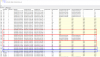
This issue happened in the past and rebooting servers have fixed, but not anymore.
When I execute Update Membership on device collections from CAS, hourglass doesn't disappear. The collection updates membership correctly, it's just the hourglass never goes away.
As far as I understood, collection evaluation is executed from primary site servers with db. When I update memberships from primary site servers, collection evaluation finishes successfully and hourglass disappears as expected. However, when I do from CAS server, hourglass doesn't disappear. Looking at colleval.log log files from both primary site servers, collection evaluation finishes with no issue. It's just CAS still showing hourglasses for almost 3 days now.
I tried;
- reboot two primary site servers and cas server, didn't fix
- examined colleval.logs in primary site servers, no error or issue. Evaluation finishes on time and membership updates successfully.
- Monitoring> Database Replication> Replication Link Analyzer shows no errors or warnings, all green check marks.
- SQL service account at CAS has SA permission, ownership of site databases of two primary site servers. No SQL issue.
- collections are limited to All Systems which is not changeable (grayed out ) and it's set to incremental.
I tried to change limited collection to a different one and take out both incremental and full, it's still showing hourglass. Again, the collection updates are successfully done as colleval.log show on both primary site servers and numbers updated as well in CAS, it's just the annoying hourglass icon doesn't disappear.
Environment:
1 CAS and 2 Primary site servers : SCCM 1702
Updated:
I think I found the cause of hourglass on CAS.
Collections with hourglass have collection update history of removed sites (Site 3,4) and collections with no hourglass have no history of removed sites in Table dbo.Collections_L.
Please, advise how to change table to read-write and delete stale records. It seems as 'tr_Collections_L_NonUpdatable_INS_UPD_DEL' trigger can be disabled temporarily and the stale records can be deleted. But I like to know if it's safe to do this way, currently I have no knowledge how SQL trigger works, will read about it...


