Forums on Intune, SCCM, and Windows 11

Welcome to the forums. Register a free account today to become a member! Once signed in, you'll be able to participate on this site by adding your topics and posts, as well as connect with other members through your own private inbox!

SOLVED High CPU usage on Windows 10 clients by SMS-Agent-Host

  • Thread starter Thread starter MaGicApr
  • Start date Start date
  • Replies Replies 14
  • Views Views 31K
Status
Not open for further replies.

MaGicApr

Member
Messages
7
Reaction score
2
Points
3
Hello, I have a really big problem on our Windows 10 clients. All PCs have a high CPU utilization of around 25 to 50% every day for several hours. This is caused by the SMS agent host service / CcmExec.exe. Unfortunately, I can't even see what it's doing. I can not explain the behavior. I have already reduced all Reoports to a minimum or switched them off completely. There is no significant network traffic or high write rates on data media. Only the CPU is subjected to massive and constant loads. The problem affects both virtual machines and physical ones. This is a real big problem on laptops. It started around mid-December 2019. At that point, I made no changes to the environment or installed updates.
Can someone please give me advice on what else I can check and where to look further?
I use Configuration Manager 1910.
Thanks in advance.
Best regards
Marcel
 

Attachments
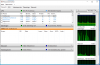
  • ressourcemonitor.PNG
    ressourcemonitor.PNG
    50.7 KB · Views: 20
Last edited:
Check your client setting and if anything set to run frequently like software inventory scan or full scan.
 
Deactivating or reducing everything was the first thing I did.

Software metering is disabled
Software inventory only runs every 7 days
Hardware inventory runs every 7 days (once a month on laptops)
Software deployment re-evaluation every 7 days
Software update scan every 7 days
Windows Analytics is deactivated

Did I forgot something?

25-50% is about a CPU core ... constant. Our VCenter admin is not very pleased about it. The laptop users complain about short battery runtimes and loud fans.
 
Around 3000 PCs are affected in my network. There is a lot of CPU time that is burned for this.
I am administering a second, smaller environment with approx. 300 PCs and 50 servers, where the problem does not occur.
 
Hi . Since its related to SMS agent host service something is running related to sccm in the Client machines. You should find out that first. I would recommend to check the specific time at which CPU utilization is high and check any deployment is running on that particular time. Take any machine and logon locally.
 
Hello Gokul,
thank you for trying to help me.
I can't figure out what the client is doing. When I look at it with the Process Explorer, I cannot see that something is happening, only that CPU power is being consumed. The process does not access files. The SMS agent sometimes does not write anything in log files for several minutes. No packages are downloaded to be installed. Nothing, only CPU load is generated.
Policies appear to be running. But over hours or days?
 
Hi Marcel,

Honestly i am not sure the cause of your issue, It could be due to many reasons. Sometimes it could be due to WMI corrupted. As a part of basic troubleshooting you can do below steps on one test machine. NOTE - As a best practice do testing before going to production
-Restart WMI
-Rename WMI repository
 
Hello Gokul,
the problems started without changing the configuration or installing updates. There may also be a problem with the Symantec Endpoint Protection virus scanner.
From the TechNet forum I got the hint to look at the call stack of the process. Accordingly, it seems that a report is generated during these times when the CPU is busy. The question arises as to how long the normal terms are for such operations. Runtimes of severel hours are probably not normal.
Best regards
Marcel
 
Yes I agree with that. I have seen McAfee creates utilization in one of my customer.
 
Hi Marcel,

Did you find a solution for the issue?
I have a similar issue and have not been able to find what is wrong, I have tried to remove AV but i see the same issue.

I do not really see any good stuff in the log anywhere.
Br Kris
 
Hello Kris,
unfortunately I have not yet found a solution to the problem. My last approach, which could be Symantec Antivirus, turned out to be wrong. Since I didn't know what to do and couldn't find any help in the TechNet forum, I opened a ticket at Microsoft Support, which is currently still open.

Best regards
Marcel
 
Hi,
an update to my problem:
I think I found the solution in my case. The Configuration Manager client apparently cannot handle a large number of supersedences. Unfortunately I made the mistake of using this function for applications that are updated frequently (Firefox, Chrome, FlashPlayer). After deleting all the old packages and removing the supersedences from the most recent package, everything is running great again!
The problem was that too many supersedences had to be checked and the SCCM client was overwhelmed. I recognized this after I switched on verbose logging and an enormous number of entries appeared in "AppIntentEval.log".
Unfortunately, this solution was not a result of the ticket at Microsoft.

Best regards
Marcel
 
Status
Not open for further replies.

Forum statistics

Threads
7,133
Messages
27,856
Members
18,151
Latest member
TonyGTR
Back
Top