Hi,
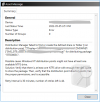
I have upgraded SCCM from 2103 to 2107 recently, after that I am getting the following Error when trying to deploy Monthly Windows Updates:
" Distribution Manager failed to find or create the defined share or folder () on distribution point "["Display=\\...........\"]MSWNET:["SMS_SITE=ABC"]\\.........\" for distributing package "ABC0003C".
Possible cause: Windows NT distribution points might not have at least one available NTFS drive.
Solution: Verify that there is at least one NTFS drive with enough free disk space to store the package. Then, verify that the distribution point directory exists, has the proper permissions, and is accessible."
It was OK before upgrade.
We downloading and deploying Software Updates using Automatic Deployment Rules and and Deployment Packages.
I will be very much thankful for assistance.
Thanks,
Muhammad
Toronto, Canada
I have upgraded SCCM from 2103 to 2107 recently, after that I am getting the following Error when trying to deploy Monthly Windows Updates:
" Distribution Manager failed to find or create the defined share or folder () on distribution point "["Display=\\...........\"]MSWNET:["SMS_SITE=ABC"]\\.........\" for distributing package "ABC0003C".
Possible cause: Windows NT distribution points might not have at least one available NTFS drive.
Solution: Verify that there is at least one NTFS drive with enough free disk space to store the package. Then, verify that the distribution point directory exists, has the proper permissions, and is accessible."
It was OK before upgrade.
We downloading and deploying Software Updates using Automatic Deployment Rules and and Deployment Packages.
I will be very much thankful for assistance.
Thanks,
Muhammad
Toronto, Canada