Forums on Intune, SCCM, and Windows 11

Welcome to the forums. Register a free account today to become a member! Once signed in, you'll be able to participate on this site by adding your topics and posts, as well as connect with other members through your own private inbox!

SOLVED Device Collection for Windows Server Datacenter and Standard editions

Status
Not open for further replies.

Harshit Pandey

Well-Known Member
Messages
290
Solutions
8
Reaction score
9
Points
18
Hi all,

We have a mix of Windows Servers where some of them are datacenter editions and others are standard editions. I am looking to create a separate device collection for Windows server Standard and datacenter server edition. How to do that? I have seen some WQL queries that use OS caption to differentiate between standard and datacenter editions. Can I avoid using the caption and use something that works?
 
Solution
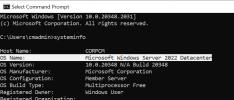
You will have to use the operating system name / caption in the WQL query to distinguish between the standard and datacenter editions of Windows Server.

1723716944545.png

So the query will be something like this

Windows Server 2025 Datacenter Edition

SQL:
select SMS_R_System.ResourceId, SMS_R_System.ResourceType, SMS_R_System.Name, SMS_R_System.SMSUniqueIdentifier, SMS_R_System.ResourceDomainORWorkgroup, SMS_R_System.Client from  SMS_R_System inner join SMS_G_System_OPERATING_SYSTEM on SMS_G_System_OPERATING_SYSTEM.ResourceID = SMS_R_System.ResourceId where SMS_G_System_OPERATING_SYSTEM.Version = "10.0.26100" and SMS_G_System_OPERATING_SYSTEM.Caption = "Microsoft Windows Server 2025 Datacenter"

Windows Server 2025 Standard edition...
You will have to use the operating system name / caption in the WQL query to distinguish between the standard and datacenter editions of Windows Server.

1723716944545.png

So the query will be something like this

Windows Server 2025 Datacenter Edition

SQL:
select SMS_R_System.ResourceId, SMS_R_System.ResourceType, SMS_R_System.Name, SMS_R_System.SMSUniqueIdentifier, SMS_R_System.ResourceDomainORWorkgroup, SMS_R_System.Client from  SMS_R_System inner join SMS_G_System_OPERATING_SYSTEM on SMS_G_System_OPERATING_SYSTEM.ResourceID = SMS_R_System.ResourceId where SMS_G_System_OPERATING_SYSTEM.Version = "10.0.26100" and SMS_G_System_OPERATING_SYSTEM.Caption = "Microsoft Windows Server 2025 Datacenter"

Windows Server 2025 Standard edition

SQL:
select SMS_R_System.ResourceId, SMS_R_System.ResourceType, SMS_R_System.Name, SMS_R_System.SMSUniqueIdentifier, SMS_R_System.ResourceDomainORWorkgroup, SMS_R_System.Client from  SMS_R_System inner join SMS_G_System_OPERATING_SYSTEM on SMS_G_System_OPERATING_SYSTEM.ResourceID = SMS_R_System.ResourceId where SMS_G_System_OPERATING_SYSTEM.Version = "10.0.26100" and SMS_G_System_OPERATING_SYSTEM.Caption = "Microsoft Windows Server 2025 Standard"
 
Solution
That's incorrect. The query that I provided works and I have tested it on the production server. If it doesn't work, you can contact me.
 
Status
Not open for further replies.
Back
Top