Forums on Intune, SCCM, and Windows 11

Welcome to the forums. Register a free account today to become a member! Once signed in, you'll be able to participate on this site by adding your topics and posts, as well as connect with other members through your own private inbox!

SOLVED Deploy Application to User Security Group

Status
Not open for further replies.

lalajee2018

Well-Known Member
Messages
143
Reaction score
6
Points
18
Hi I would Like to delopy Office application to user which are part of a Security Group. I would Like sccm to have office avaiable to user when they login to any new machine within the company.

This is What I have done

Create Security Group "Office365" add all of the user to this group.

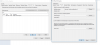
Then Created a User Collection in SCCM.

select SMS_R_USER.ResourceID,SMS_R_USER.ResourceType,SMS_R_USER.Name,SMS_R_USER.UniqueUserName,SMS_R_USER.WindowsNTDomain from SMS_R_User where SMS_R_User.SecurityGroupName = "DOMAIN\\Office365"
1.PNG


Then Create a Application Office 365

2.PNG

Then Delopy office 365 to User collection.

I dont know what i'm doing wrong here because the software is not available to user which are part of the security group.
 
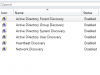
The query seems to be correct. I hope you have enable AD group and User discovery. Perform update membership and refresh the collection to get the updates ASAP. Also check if the collection has the users for whom you intend to deploy O365.
 
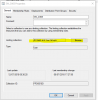
I have done that and also update the membership which now show my user ID, but its not displying the software. I have run machine update, software update, hardware inventory and more but still no software.

3.PNG

What could stop this.
 
I still cant do this. I'm still not able to install office base on user collection but I can do it based on device..
 
have you checked the Application Catalog? App deployed to user will come up in Application Catalog and app deploy to machine will come up in Software Center.
 
I did check the application cat and I cant see the office 365. if I add the deloperment to SYSTEM I can see it and install it but when I deploy it to any user based collections it disnt work.
 
i do have to ask you that you actually have yourself or your test user in that user collection?
 
i do have to ask you that you actually have yourself or your test user in that user collection?
My self and test user is part of security group which is part of the user contributions and I can see my name n test user are picked up in sccm
 
After the upgrade to SCCM 1806, this is working fine now. I didnt make any different changes expect for removing and re-added myself into security groups.

Thank you all for your help on this
 
Status
Not open for further replies.

Forum statistics

Threads
7,156
Messages
27,932
Members
18,235
Latest member
pldbasis
Back
Top