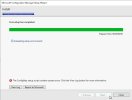
CM setup installation stuck at "Evaluating setup environment" phase. Based on log, it stated that as below
INFO: Validate if UNC server and share are parsed correctly $$<Configuration Manager Setup><03-26-2024 14:11:36.353-480><thread=10580 (0x2954)>
Connecting to root\cimv2 on database server $$<Configuration Manager Setup><03-26-2024 14:11:36.368-480><thread=10580 (0x2954)>
CWmi::Connect(): ConnectServer(Namespace) failed. - 0x80070005~ $$<Configuration Manager Setup><03-26-2024 14:11:36.368-480><thread=10580 (0x2954)>
INFO: Cannot to connect to WMI namespace root\cimv2 on 100xxxxxx, HR = 80070005. $$<Configuration Manager Setup><03-26-2024 14:11:36.368-480><thread=10580 (0x2954)>
ERROR: UNC path specified for database setup is invalid $$<Configuration Manager Setup><03-26-2024 14:11:36.368-480><thread=10580 (0x2954)>
~~===================== Failed Configuration Manager Server Setup ===================== $$<Configuration Manager Setup><03-26-2024 14:11:36.384-480><thread=10580 (0x2954)>
Additional info : WBEMTEST unsuccessfull with error 0x80070005 Win32:: Access is denied
Anybody have facing this before?
INFO: Validate if UNC server and share are parsed correctly $$<Configuration Manager Setup><03-26-2024 14:11:36.353-480><thread=10580 (0x2954)>
Connecting to root\cimv2 on database server $$<Configuration Manager Setup><03-26-2024 14:11:36.368-480><thread=10580 (0x2954)>
CWmi::Connect(): ConnectServer(Namespace) failed. - 0x80070005~ $$<Configuration Manager Setup><03-26-2024 14:11:36.368-480><thread=10580 (0x2954)>
INFO: Cannot to connect to WMI namespace root\cimv2 on 100xxxxxx, HR = 80070005. $$<Configuration Manager Setup><03-26-2024 14:11:36.368-480><thread=10580 (0x2954)>
ERROR: UNC path specified for database setup is invalid $$<Configuration Manager Setup><03-26-2024 14:11:36.368-480><thread=10580 (0x2954)>
~~===================== Failed Configuration Manager Server Setup ===================== $$<Configuration Manager Setup><03-26-2024 14:11:36.384-480><thread=10580 (0x2954)>
Additional info : WBEMTEST unsuccessfull with error 0x80070005 Win32:: Access is denied
Anybody have facing this before?