Forums on Intune, SCCM, and Windows 11

Welcome to the forums. Register a free account today to become a member! Once signed in, you'll be able to participate on this site by adding your topics and posts, as well as connect with other members through your own private inbox!

PENDING Could not retrieve value for MDM_ConfigSetting . Error 0x80041013

  • Thread starter Thread starter Irsyad
  • Start date Start date
  • Replies Replies 10
  • Views Views 61K

Irsyad

Member
Messages
6
Reaction score
0
Points
1
Hi Prajwal Desai,

I have an issues on some of my server which is not getting fully installed SCCM client.
Appreciate your advice how to solve it. Log details as per attached.


Task 'Configuration Manager Client Upgrade Task' does not exist
Could not retrieve value for MDM_ConfigSetting . Error 0x80041013

Also action item only visible 2 item and also missing "Configuration" tab.
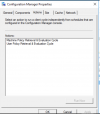
1622176444246.png
 

Attachments

Hello,
We have the same issue with Microsoft Endpoint Configuration Manager 1910, we have plans to update it in a few weeks, there is no more support on this version.

By the way we find a workaround for this problem who can happen in 10% of our clients,

There are theses 2 powershell commands:

Invoke-WmiMethod -Namespace root\ccm -Class SMS_Client -Name ResetPolicy -ArgumentList "1"
Invoke-WmiMethod -Namespace root\ccm -Class SMS_Client -Name TriggerSchedule -ArgumentList "{00000000-0000-0000-0000-000000000021}"

Who will reset the client Policy and the client is able to connect to the MP after a few minutes.

By the way, when this problem comes, there is no contact between the MP and the client, in our case if we check the log "CcmNotificationAgent.log" we can see there is no contact with the main server, after running the 2 powershell commands the contact is established again.

2021-05-31_115749.jpg
For the moment we didn't find the main cause of this problem, I had a look on our MP and there are some logs with errors, but maybe it will be solved with the next update to the version 2103...

I hope it can help you.
Regards
 
Based solely on the screenshot, it will be a boundary issue.
I already check the ip address within our boundary...is there any things that i need to check ? might be im not clearly understand what you mean about "boundries issues".

Thanks in advance
 
I already check the ip address within our boundary...is there any things that i need to check ? might be im not clearly understand what you mean about "boundries issues".

Thanks in advance
Exactly what type of boundaries are you using? I hope ONLY IP Ranges, anything else is problematic.
 
Having the same issue as well any solutions to this?
And, I will ask you the exact same questions already listed above.

Exactly what type of boundaries are you using? I hope ONLY IP Ranges, anything else is problematic.
Can you have confirm that an MP is assigned to that boundary. Have you reviewed the logs to confirm that the client is seeing the boundary?
 
I can confirm that running these two powershell commands in a "run as admininstrator" powershell window on the machine fixed the issue. No its not a boundary issue. SCCM is just buggy. Been working with this product for years and years and I swear...

Invoke-WmiMethod -Namespace root\ccm -Class SMS_Client -Name ResetPolicy -ArgumentList "1"
Invoke-WmiMethod -Namespace root\ccm -Class SMS_Client -Name TriggerSchedule -ArgumentList "{00000000-0000-0000-0000-000000000021}"

How long this will work for I do not know.
========================
PS C:\Windows\system32> Invoke-WmiMethod -Namespace root\ccm -Class SMS_Client -Name ResetPolicy -ArgumentList "1"


__GENUS : 1
__CLASS : __PARAMETERS
__SUPERCLASS :
__DYNASTY : __PARAMETERS
__RELPATH : __PARAMETERS
__PROPERTY_COUNT : 1
__DERIVATION : {}
__SERVER : %name%
__NAMESPACE : ROOT\ccm
__PATH : \\ABSOLUTE\ROOT\ccm:__PARAMETERS
ReturnValue :
PSComputerName : %name%


PS C:\Windows\system32> Invoke-WmiMethod -Namespace root\ccm -Class SMS_Client -Name TriggerSchedule -ArgumentList "{00000000-0000-0000-0000-000000000021}"


__GENUS : 1
__CLASS : __PARAMETERS
__SUPERCLASS :
__DYNASTY : __PARAMETERS
__RELPATH : __PARAMETERS
__PROPERTY_COUNT : 1
__DERIVATION : {}
__SERVER : %name%
__NAMESPACE : ROOT\ccm
__PATH : \\ABSOLUTE\ROOT\ccm:__PARAMETERS
ReturnValue :
PSComputerName :%name%


PS C:\Windows\system32>
 
We had the same error when we installed the client over the existing client. In our case the server had been renamed and moved to another domain, but the namespace of SCCM WMI class remained the same. We ended up deleting the old client and installing the client on clean environment.
 
Back
Top