Forums on Intune, SCCM, and Windows 11

Welcome to the forums. Register a free account today to become a member! Once signed in, you'll be able to participate on this site by adding your topics and posts, as well as connect with other members through your own private inbox!

PENDING Configuration Report Server

  • Thread starter Thread starter juannabis
  • Start date Start date
  • Replies Replies 14
  • Views Views 3K

juannabis

Well-Known Member
Messages
96
Solutions
1
Reaction score
0
Points
6
Hello,
I have the HTTP Error 401 when I try to connect to my reports.
Recently, I changed my Web Service URL and Web Portal URL, but now I can't to access to reports.
Thank you.
 
What does this mean? are you talking about the web interface or the console? if it is the console did you remove and install the Reporting point again?
 
Last edited:
Hello,
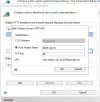
First, I open Report Server Configuration Manager and I configure Web Service URL and Web Portal URL (I have the same configuration).
Before, I had in the Report Server HTTP URL:
* IP Address: All Asigned
* TCP Port: 80

Now, I have this configuration:
* Host Header Name: myserverName.domain.es
* TCP Port: 80

I'm talking about the web interface with HTTP Error 401 and the console. In the consolo don't appear any report.

Thank you.
 
Until the SSRS website works that is not point in looking at the ConfigMgr. Did you restart SSRS? Did you reboot the server? did you review the Event viewer for errors?
 
Is this logs?
 

Attachments

  • reports_01.jpg
    reports_01.jpg
    85.2 KB · Views: 11
  • reports_02.jpg
    reports_02.jpg
    622.4 KB · Views: 9
  • reports_03.jpg
    reports_03.jpg
    51.4 KB · Views: 11
I have this error in the SMS_SRS_REPORTING_POINT component:

The report server service is not running on Reporting Service Point server "serverName.URJC.ES"; start the service to enable reporting.

Thank you.
 
Until the SSRS is healthy outside of ConfigMgr. Make sure that SSRS is healthy and the you have reviewed the logs.
 
Hello,

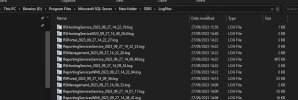
I find this log in the folder E:\Program Files\Microsoft SQL Server\MSSQL11.MSSQLSERVER\MSSQL\Log\ERRORLOG.1.


2023-11-10 07:00:33.21 spid6s Error: 17054, Severity: 16, State: 1.
2023-11-10 07:00:33.21 spid6s The current event was not reported to the operating system error log. Operating system error = (null). You may need to clear the operating system error log if it is full.
2023-11-10 07:00:33.68 spid27s The Service Broker endpoint has stopped listening for connections.
2023-11-10 07:00:33.68 spid27s Service Broker manager has shut down.
2023-11-10 07:00:34.56 Logon Error: 18456, Severity: 14, State: 23.
2023-11-10 07:00:34.56 Logon Login failed for user 'URJC\ALBERTI$'. Reason: Access to server validation failed while revalidating the login on the connection. [CLIENT: ::1]
2023-11-10 07:00:34.56 spid352 Error: 18056, Severity: 20, State: 23.
2023-11-10 07:00:34.56 spid352 The client was unable to reuse a session with SPID 352, which had been reset for connection pooling. The failure ID is 23. This error may have been caused by an earlier operation failing. Check the error logs for failed operations immediately before this error message.
2023-11-10 07:00:34.56 Logon Error: 18456, Severity: 14, State: 23.
2023-11-10 07:00:34.56 Logon Login failed for user 'URJC\ALBERTI$'. Reason: Access to server validation failed while revalidating the login on the connection. [CLIENT: ::1]
2023-11-10 07:00:34.56 spid256 Error: 18056, Severity: 20, State: 23.
2023-11-10 07:00:34.56 spid256 The client was unable to reuse a session with SPID 256, which had been reset for connection pooling. The failure ID is 23. This error may have been caused by an earlier operation failing. Check the error logs for failed operations immediately before this error message.
 
Hello,

I find this log in the folder E:\Program Files\Microsoft SQL Server\MSSQL11.MSSQLSERVER\MSSQL\Log\ERRORLOG.1.


2023-11-10 07:00:33.21 spid6s Error: 17054, Severity: 16, State: 1.
2023-11-10 07:00:33.21 spid6s The current event was not reported to the operating system error log. Operating system error = (null). You may need to clear the operating system error log if it is full.
2023-11-10 07:00:33.68 spid27s The Service Broker endpoint has stopped listening for connections.
2023-11-10 07:00:33.68 spid27s Service Broker manager has shut down.
2023-11-10 07:00:34.56 Logon Error: 18456, Severity: 14, State: 23.
2023-11-10 07:00:34.56 Logon Login failed for user 'URJC\ALBERTI$'. Reason: Access to server validation failed while revalidating the login on the connection. [CLIENT: ::1]
2023-11-10 07:00:34.56 spid352 Error: 18056, Severity: 20, State: 23.
2023-11-10 07:00:34.56 spid352 The client was unable to reuse a session with SPID 352, which had been reset for connection pooling. The failure ID is 23. This error may have been caused by an earlier operation failing. Check the error logs for failed operations immediately before this error message.
2023-11-10 07:00:34.56 Logon Error: 18456, Severity: 14, State: 23.
2023-11-10 07:00:34.56 Logon Login failed for user 'URJC\ALBERTI$'. Reason: Access to server validation failed while revalidating the login on the connection. [CLIENT: ::1]
2023-11-10 07:00:34.56 spid256 Error: 18056, Severity: 20, State: 23.
2023-11-10 07:00:34.56 spid256 The client was unable to reuse a session with SPID 256, which had been reset for connection pooling. The failure ID is 23. This error may have been caused by an earlier operation failing. Check the error logs for failed operations immediately before this error message.
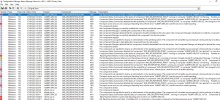
That doesn't provide any useful details, you will need to dig into it more.
 
Back
Top