Forums on Intune, SCCM, and Windows 11

Welcome to the forums. Register a free account today to become a member! Once signed in, you'll be able to participate on this site by adding your topics and posts, as well as connect with other members through your own private inbox!

PENDING Configuration manager console loading issues

  • Thread starter Thread starter sakthi1811
  • Start date Start date
  • Replies Replies 7
  • Views Views 1K

sakthi1811

New Member
Messages
4
Reaction score
0
Points
1
Hi, I have faced issue while upgrading the 2403. So, finally MS team recommended to restore the database and revert the VM snapshot. So, I have restore database and reverted the snapshot. Note that in my environment separate database server and separate sccm server. After restored everything with same Database name and same vm name with ip then tried to trigger the connection between database and sccm server is passed but, unable to open the configuration manager console. Kindly help me to resolve the issue.
 
What error are you seeing when you launch the console?. And did you check with MS team on why this issue is occurring after the DB restore?
 
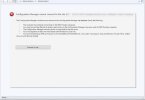
You'll need to manually verify each of those points shown in the console. There is no sure shot answer here because you just restored the database and things may have changed.
 
You'll need to manually verify each of those points shown in the console. There is no sure shot answer here because you just restored the database and things may have changed.
Sir, if possible to share me the some more details coz, it's not going to up then I loss my job here. Recently came to singapore after crossed lots of problems.
 
Sir, if possible to share me the some more details coz, it's not going to up then I loss my job here. Recently came to singapore after crossed lots of problems.
My basic question here is, when you're working with Microsoft support on this issue, what is stopping you from getting help from MS on the same?
 
My basic question here is, when you're working with Microsoft support on this issue, what is stopping you from getting help from MS on the same?

My basic question here is, when you're working with Microsoft support on this issue, what is stopping you from getting help from MS on the same?
Sir, MS team not responding properly and they are coming checking logs and finally telling shift is over and handover to another engineer, aging repeating same. So, I tried to get help from you. Coz, i saw lots of posts related to sccm. I saw below link it will work out sir?
 
Sir, MS team not responding properly and they are coming checking logs and finally telling shift is over and handover to another engineer, aging repeating same. So, I tried to get help from you. Coz, i saw lots of posts related to sccm. I saw below link it will work out sir?
Ok, noted. Now in your case, the console is failing to load, and it can occur due to several issues. There is no fixed solution here because of the following reasons:

1. There is no access to your environment and without that, nobody can point you to the correct solution.
2. The console shows a list of points that you should verify one by one and troubleshoot that issue.
3. You'll need to review the console logs, MP logs to determine if there are any errors.
4. Following the database restoration, you must visit monitoring to assess the components' health status and identify any errors.

As a database restore has been completed and the MS team has access to your setup for troubleshooting, I recommend that you collaborate with them on this. I agree that in some cases the support may seem slow, but MS support always provides a proper solution. I can offer you a few workarounds from my end, but they might or might not be effective because we do not know where the error is. I hope you got my point.
 
Back
Top