Forums on Intune, SCCM, and Windows 11

Welcome to the forums. Register a free account today to become a member! Once signed in, you'll be able to participate on this site by adding your topics and posts, as well as connect with other members through your own private inbox!

PENDING Co-managed windows 10 devices

  • Thread starter Thread starter MJ-Tech
  • Start date Start date
  • Replies Replies 6
  • Views Views 9K

MJ-Tech

Well-Known Member
Messages
217
Solutions
25
Reaction score
21
Points
18
I don't have much experience with co-management.
Could someone please help me troubleshoot the following issues?
Our requirements is,
  • We needed to check the compliance status on the Intune portal.
  • Deploy Windows 10 updates from Intune on a select number of PCs that are connected to a VPN or the company network.
  • Deploy few policies from Intune

    Issue description:
All of our Windows 10 devices are managed through an on-premises environment (local domain + SCCM), and we would want to manage a few Windows 10 computers using Intune based on our requirements. We recently activated the co-managed option, and all Windows 10 PCs are now mirrored on the Intune portal,

1677148720556.png
Next ,
I've created a new security group and assigned it to all of our Windows 10 devices and added the security group in compliance policies and configuration profiles (with basic settings)
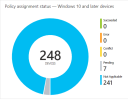
When I checked the status the next day, all machines were marked as not applicable,

Compliance Policies:
1677149208470.png

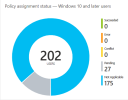
Configuration profiles:

1677149283327.png

I created a new profile in Update rings, feature updates, and quality updates and assigned it to a few of windows 10 for testing but all windows 10 testing machines were marked as not applicable.

Could you kindly tell me how to troubleshoot the above problem?
 

Attachments
  • 1677149219930.png
    1677149219930.png
    27.8 KB · Views: 2
Last edited:
Hi. So in your Config Manager console under your Cloud Attach settings have you moved the workload from Configuration Manager to Pilot Intune or Intune?
 
Hi. So in your Config Manager console under your Cloud Attach settings have you moved the workload from Configuration Manager to Pilot Intune or Intune?
Yeah, the workloads are now assigned to Intune pilot, and the assigned collections contain 20 devices.
 
I've never played around with update rings in InTune but have you tried pushing any other policies to your test collection to see if anything is working?
 
I deployed a few Win32 Windows apps on the testing device, however the status indicates that they are not applicable. (Note: I observe that a few testing device compliance status are appearing as compliant, but the update ring indicates that they are not applicable.)
Let me reimage another Computer and repeat this setup.
 
Is it necessary to connect the Windows 10 device to the office network in order to manage via Intune using co-management workload, or is having internet access sufficient?

The reason for the above question is, when I check at the complaint status on the Intune portal, I get some random results,

i.e.,

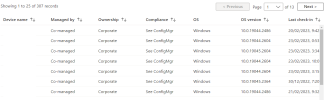
  • Even though the windows 10 machine is connected to the office network (LAN), the SCCM console device status indicates offline and the intune compliance status shows - see ConfigMgr

SCCM:
1677590952965.png


Intune:
1677590978116.png

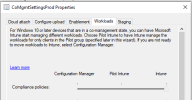
Workloads: Note: I have already moved the workloads for the complaince policies to Intune.
1677590939402.png
 

Attachments

  • 1677591004474.png
    1677591004474.png
    47.7 KB · Views: 3
Sorry for the delayed response, have been away. I would think since it says Co-Managed and you already switched the workloads in SCCM you shouldn't need to be connected to your corporate network. If you go on the computer under Settings -> Accounts -> Access Work or School -> click on the Connected to Domain and click Info it should tell you about any applied policies, applications, etc. You can export a report which might give you more info. Also if you go into Intune admin center and click on the device and click on the different tabs - Device Compliance, Device Configuration, Managed Apps you can click on the different items and possibly get more info there about why things aren't applying.
 

Forum statistics

Threads
7,144
Messages
27,895
Members
18,190
Latest member
escdarck

Trending content

Back
Top