

Leroy
New Member
- Messages
- 3
- Reaction score
- 1
- Points
- 3
Hello Guys,
I would like to know if there is any best practice on how to update the Client Version same as the Site version?
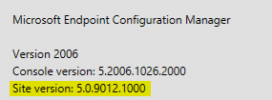
I have been troubleshooting the white screen for the software center and I found out that the white screen was caused due to site version not sync.
Some of the end clients are updated while most of the clients are offline due to outdated site version

Site Version:
Client Version:
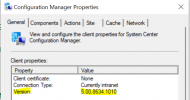
Here are the troubleshooting steps I have done.
1.) Scenario 1: Uninstall SCCM Client and then install the SCCM client, I was able to install it but the version it is getting is the old version, and error will appear to load the software center. I have read the article here https://www.prajwaldesai.com/ccmsetup-failed-with-error-code-0x80080005/ still I encounter the error
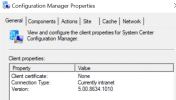
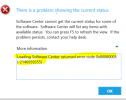
Take note that some of the clients are updated to the latest site version while others are not updated, I have checked the client upgrade and it is enabled.
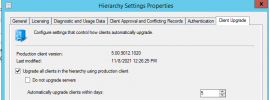
2.) Scenario 2: I can install the SCCM with correct site version when I do reimage of the windows but it is tedious as we have few dozens of agents that are not updated with the client site version.
I would like to know if there is any best practice on how to update the Client Version same as the Site version?
I have been troubleshooting the white screen for the software center and I found out that the white screen was caused due to site version not sync.
Some of the end clients are updated while most of the clients are offline
due to outdated site versionSite Version:
Client Version:
Here are the troubleshooting steps I have done.
1.) Scenario 1: Uninstall SCCM Client and then install the SCCM client, I was able to install it but the version it is getting is the old version, and error will appear to load the software center. I have read the article here https://www.prajwaldesai.com/ccmsetup-failed-with-error-code-0x80080005/ still I encounter the error
Take note that some of the clients are updated to the latest site version while others are not updated, I have checked the client upgrade and it is enabled.
2.) Scenario 2: I can install the SCCM with correct site version when I do reimage of the windows but it is tedious as we have few dozens of agents that are not updated with the client site version.
Last edited:
