
This is the first time I have attempted to install or use MCM.
The goal of the project is to be able to install a fresh image on bare hardware. This is a task we do between 5 and 50 times a week.
I have installed Microsoft Endpoint Config Mgr 2203 on SQL 2019 on Server 2022.
Also installed MDK (6.3.8456.1000), ADK (10.1.22621.1) and the Windows PE extensions for ADK (10.1.22621.1).
IIS is installed.
WSUS is also installed, as I read it was required. I have done no configuration in WSUS other than install and allow it to do the automatic configuration.
All software resides on 1 server. Server and target are on the same IP v4 subnet.
I have Wireshark and SSMS available.
I downloaded the Windows 11 installation ISO from Microsoft.
I was able to create:
I can boot the target machine using the media created.
It loads Configuration Manager, then a few seconds later shows "Welcome to the Task Sequence Wizard"
I click next
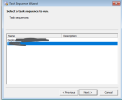
I am presented with a Task Sequence Wizard that allows me to change network settings. None should be required, so I click Next. I then see the Wizard showing me my Task Sequence. I select it and click Next.
A few seconds later the Task Sequence Wizard shows the error:
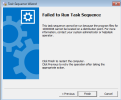
"Failed to Run Task Sequence"
The task sequence cannot be run because the program files for 10000008 cannot be located on a distribution point. For more information..."
I can see with Wireshark that the target:
1. Gets an appropriate IP address, and
2. Communicates with the correct Distribution Point
When I check the Management server, I see that 10000008 is the Windows 11 boot image. I check the status and determine that it is, in fact, on the DP and is up-to-date.
I followed the procedure here and then updated my boot image.
I then regenerated the boot media. After confirming that all updates to the DP were complete, I rebooted the target using the new boot media.
I see the following errors:
"Content location request for 10000008:5 failed. (Code 0x80040102"
"Failed to resolve PackageID=10000008"
"Failed to resolve selected task sequence dependancies. (Code 0x80040102)"
"ThreadToResolveAndExecuteTaskSequence failed. (Code 0x80040102)"
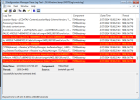
If I allow the machine to PXE boot, rather than boot from media, I see the following in SMSPXE.log on the DP:
<![LOG[TFTP: 172.16.54.178: request for smsboot\10000008\x64\wdsmgfw.efi.]LOG]!><time="10:03:32.158+360" date="03-27-2024" component="SCCMPXE" context="" type="1" thread="7160" file="tftpserver.cpp:52">
I assume that "smsboot\10000008\x64\" is a logical path, and wdsmgfw.efi is the file it is failing to find. I can confirm that wdsmgfw.efi does not exist anywhere on the server.
I suspect that is my real problem.
Clearly I have done one or more things incorrectly. I would appreciate any assistance resolving these issues.
The goal of the project is to be able to install a fresh image on bare hardware. This is a task we do between 5 and 50 times a week.
I have installed Microsoft Endpoint Config Mgr 2203 on SQL 2019 on Server 2022.
Also installed MDK (6.3.8456.1000), ADK (10.1.22621.1) and the Windows PE extensions for ADK (10.1.22621.1).
IIS is installed.
WSUS is also installed, as I read it was required. I have done no configuration in WSUS other than install and allow it to do the automatic configuration.
All software resides on 1 server. Server and target are on the same IP v4 subnet.
I have Wireshark and SSMS available.
I downloaded the Windows 11 installation ISO from Microsoft.
I was able to create:
- A boot image
- An Operating System image
- A driver pack (removed from Task Sequence for simplified testing.
- A bootable USB (from Create Task Sequence Media)
- A task sequence to bind them together.
I can boot the target machine using the media created.
It loads Configuration Manager, then a few seconds later shows "Welcome to the Task Sequence Wizard"
I click next
I am presented with a Task Sequence Wizard that allows me to change network settings. None should be required, so I click Next. I then see the Wizard showing me my Task Sequence. I select it and click Next.
A few seconds later the Task Sequence Wizard shows the error:
"Failed to Run Task Sequence"
The task sequence cannot be run because the program files for 10000008 cannot be located on a distribution point. For more information..."
I can see with Wireshark that the target:
1. Gets an appropriate IP address, and
2. Communicates with the correct Distribution Point
When I check the Management server, I see that 10000008 is the Windows 11 boot image. I check the status and determine that it is, in fact, on the DP and is up-to-date.
I followed the procedure here and then updated my boot image.
I then regenerated the boot media. After confirming that all updates to the DP were complete, I rebooted the target using the new boot media.
I see the following errors:
"Content location request for 10000008:5 failed. (Code 0x80040102"
"Failed to resolve PackageID=10000008"
"Failed to resolve selected task sequence dependancies. (Code 0x80040102)"
"ThreadToResolveAndExecuteTaskSequence failed. (Code 0x80040102)"
If I allow the machine to PXE boot, rather than boot from media, I see the following in SMSPXE.log on the DP:
<![LOG[TFTP: 172.16.54.178: request for smsboot\10000008\x64\wdsmgfw.efi.]LOG]!><time="10:03:32.158+360" date="03-27-2024" component="SCCMPXE" context="" type="1" thread="7160" file="tftpserver.cpp:52">
I assume that "smsboot\10000008\x64\" is a logical path, and wdsmgfw.efi is the file it is failing to find. I can confirm that wdsmgfw.efi does not exist anywhere on the server.
I suspect that is my real problem.
Clearly I have done one or more things incorrectly. I would appreciate any assistance resolving these issues.
Last edited:

