Hello,
I am having trouble adding WSUS role/feature to the SCCM server.
Setup is as follows:
2 VM's
1 - SCCM server, 2019
2 - SQL server, 2019, SQL 2017
Installed SQL on the SQL server.
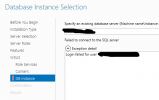
Trying to add the WSUS role on SCCM server, when I get to the 'DB Instance' step, I get an error, ' Login failed for user xxxx'
The said user is an admin on both server.
I can log into SSMS with the said user.
What am I missing here, I am completely stumped. Its probably something very simple but I am not able to figure it out.
Thank you.
I am having trouble adding WSUS role/feature to the SCCM server.
Setup is as follows:
2 VM's
1 - SCCM server, 2019
2 - SQL server, 2019, SQL 2017
Installed SQL on the SQL server.
Trying to add the WSUS role on SCCM server, when I get to the 'DB Instance' step, I get an error, ' Login failed for user xxxx'
The said user is an admin on both server.
I can log into SSMS with the said user.
What am I missing here, I am completely stumped. Its probably something very simple but I am not able to figure it out.
Thank you.