Welcome to the forums. Register a free account today to become a member! Once signed in, you'll be able to participate on this site by adding your topics and posts, as well as connect with other members through your own private inbox!
Upgrade to version 1606 - On December 15th, 2016, the baseline media for version 1606 was released to add support for additional upgrade scenarios. This new release supports the upgrade of the following to a fully licensed version of System Center Configuration Manager version 1606:
An evaluation install of System Center Configuration Manager version 1606
A release candidate install of System Center Configuration Manager
System Center 2012 Configuration Manager with Service Pack 1
System Center 2012 Configuration Manager with Service Pack 2
System Center 2012 R2 Configuration Manager
System Center 2012 R2 Configuration Manager with Service Pack 1
Thank you so much for the information provided, do we need to run the setup file(splash.hta) on existing sccm 2012 sp2 server (OR) we have any update bundle??
Please suggest and give the guidelines to follow while upgrading.
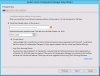
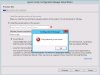
I've tried to upgrade to System Center 2016 from SCCM 2012 SP2, Downloaded files from microsoft website and the validity is showing as 180 days. But while upgrading the server in evaluation installation process by selecting "Current Branch" it is asking to enter the product key?? and the "install the evaluation edition of this product" radio button is grayed out????
It is done on lab setup. I just got to know that my existing sccm 2012 is licensed version and now tried to upgrade with evaluation version so thats why i've got the above errors. Is there any other way to upgrade it??