Forums on Intune, SCCM, and Windows 11

Welcome to the forums. Register a free account today to become a member! Once signed in, you'll be able to participate on this site by adding your topics and posts, as well as connect with other members through your own private inbox!

SOLVED Can someone write me a powershell script that changes the following

Status
Not open for further replies.

drwilkinson84

Active Member
Messages
33
Reaction score
0
Points
6
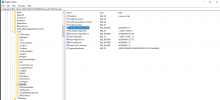
I am looking for a powershell script that changes the following registry key from 1 to 0.

Its in this location - HKEY_LOCAL_MACHINE\SOFTWARE\MICROSOFT\CCM\SECURITY key is ClientAlwaysOnInternet

I need this changed from 1 to 0.

I am then going to push this Script out to all machines using SCCM and EndPoint Manager.

Thank you in advance.

David
 

Attachments

  • registry edit.png
    registry edit.png
    89.4 KB · Views: 7
Did we discuss this previously ?. I thought you were deploying a GPO to get this done.
 
We did yeah but i was wondering if this was maybe another way to try and do this, as I cant seem to deploy it via GPO as I don’t have the option to enable this via GPO. I really want to get something pushed out this week if possible and if i can push it this way it might be easier and quicker.
 
Late but here you go.

Set-ItemProperty -Path HKLM:\SOFTWARE\Microsoft\CCM\Security\ -Name ClientAlwaysOnInternet -Value 0
 
Status
Not open for further replies.

Forum statistics

Threads
7,197
Messages
28,087
Members
18,359
Latest member
TobiasKMdS

Latest posts

Back
Top