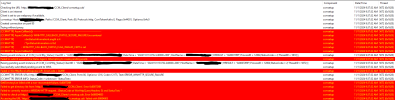
Open IIS and check binding for the certificates that IIS site using. It has to be Server and Client Authentication certificate issued by domain certificate authority (CA)I'm setting up Configuration Manager and my management point is in a critical status. Some help with these errors would be appreciated. Attaching ccmsetup.log and mpcontrol.log.
The server was previously using a self signed cert, but a domain CA cert was issued yesterday. Attached is what I see in IIS. The first row, the cert is issued by the server. The second row, the cert is issued by the domain CA.Open IIS and check binding for the certificates that IIS site using. It has to be Server and Client Authentication certificate issued by domain certificate authority (CA)
Use the second one and make sure it is dual purpose CA issued cert. Restart server or IIS and let us know.The server was previously using a self signed cert, but a domain CA cert was issued yesterday. Attached is what I see in IIS. The first row, the cert is issued by the server. The second row, the cert is issued by the domain CA.
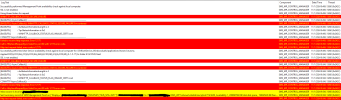
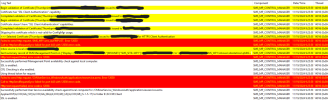
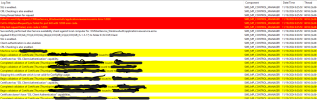
Apologies for the delay. I was waiting on somebody to request a dual purpose certificate for the server. It looks like a lot of red went away in the mpcontrol.log, but still getting the "Call to HttpSendRequestSync failed for port 80 with 12044 error code." error. Management Point is still in critical status. Any ideas of what could be causing this? Attached mpcontrol.log.Use the second one and make sure it is dual purpose CA issued cert. Restart server or IIS and let us know.
Have you tried this?Apologies for the delay. I was waiting on somebody to request a dual purpose certificate for the server. It looks like a lot of red went away in the mpcontrol.log, but still getting the "Call to HttpSendRequestSync failed for port 80 with 12044 error code." error. Management Point is still in critical status. Any ideas of what could be causing this? Attached mpcontrol.log.
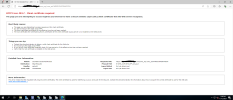
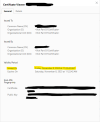
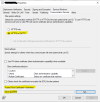
All three paths give me the attached error. Attaching cert that the browser is using and verification that it's a dual purpose certification. Also attaching configuration manager site properties. I selected "HTTPS or EHTTP." Does the "Trusted Root Certification Authorities" need to be set?Have you tired this?
Yes. Please make sure you have all the Root CA and Intermediate certs in there.All three paths give me the attached error. Attaching cert that the browser is using and verification that it's a dual purpose certification. Also attaching configuration manager site properties. I selected "HTTPS or EHTTP." Does the "Trusted Root Certification Authorities" need to be set?
I added the root CA. There are no intermediate certs between the root and the server certificate, so I didn't add anything else. I am still getting the same error in mpcontrol.log.Yes. Please make sure you have all the Root CA and Intermediate certs in there.
Is this same one which issued the cert for MP?I added the root CA. There are no intermediate certs between the root and the server certificate, so I didn't add anything else. I am still getting the same error in mpcontrol.log.
It's worth noting that this machine is STIG'd. I changed the site communication settings to HTTPS only. Now I'm getting a "Call to HttpSendRequestSync failed for port 443 with 12030 error code" error in mpcontrol.log. This seems to be a certificate based error as well. Where all do I need to put a certificate? I see that the distribution point is using a self-signed cert, but do I need to import one instead?Is this same one which issued the cert for MP?
In that case make sure IIS binding is correct for the default web site for port 443 with CA issued cert that has dual purpose.It's worth noting that this machine is STIG'd. I changed the site communication settings to HTTPS only. Now I'm getting a "Call to HttpSendRequestSync failed for port 443 with 12030 error code" error in mpcontrol.log. This seems to be a certificate based error as well. Where all do I need to put a certificate? I see that the distribution point is using a self-signed cert, but do I need to import one instead?
In that case make sure IIS binding is correct for the default web site for port 443 with CA issued cert that has dual purpose
The correct cert is binded in IIS. Attached is the https binding for IIS. Also attached mpcontrol.log now that I switched site communication to HTTPS only.In that case make sure IIS binding is correct for the default web site for port 443 with CA issued cert that has dual purpose.
I wrote (or should I say rewrote it) that blog before HTTPS was a big thing. It need to be updated to handle the certs. Some day I will get around to updating it. e.g. it will work perfectly for HTTP but it needs to be update to handle HTTPS.All three paths give me the attached error. Attaching cert that the browser is using and verification that it's a dual purpose certification. Also attaching configuration manager site properties. I selected "HTTPS or EHTTP." Does the "Trusted Root Certification Authorities" need to be set?