Forums on Intune, SCCM, and Windows 11

Welcome to the forums. Register a free account today to become a member! Once signed in, you'll be able to participate on this site by adding your topics and posts, as well as connect with other members through your own private inbox!

SOLVED Best Authority Upgrade

  • Thread starter Thread starter Abby24
  • Start date Start date
  • Replies Replies 4
  • Views Views 2K

Abby24

Member
Messages
10
Reaction score
0
Points
1
Hi,

I'm looking for some guidance.
I'm tasked with packaging the software, Best Authority 6.7, and need to include the License key and detect if Word is open as this software is an add-in to word. It should be closed and the Automatic deployment only occurs if the user is logged off.
I really appreciate any help you can provide.
 
Your first stop, should be to contact the vendor on how to add the command lines to add lic key once that is done you can move over to the issue of word being open.
 
1. Verify that the vendor code is MSI or Exe.
2, If it is an MSI, use the following command: Msiexec /i MSI> /qb! /l*v Log path>
3. If it's EXE, look for the silent parameter. (Try setup.exe /?, it will sometimes reveal the command arguments)

Next,

Do you use any packaging tools? Adminstudio, for example. If not, then proceed with the procedures below.

* Write a PowerShell VB script, then check to see if Word is running. If yes, show the message "Please close word... xxxx"
- When the user clicks the OK button, the programme should begin installing.

Once the code is developed, manual installation is fine.
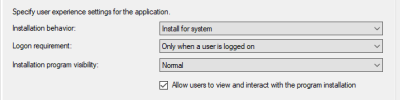
Create an SCCM profile and enable the following option,

1671201061528.png
 
1. Verify that the vendor code is MSI or Exe.
2, If it is an MSI, use the following command: Msiexec /i MSI> /qb! /l*v Log path>
3. If it's EXE, look for the silent parameter. (Try setup.exe /?, it will sometimes reveal the command arguments)

Next,

Do you use any packaging tools? Adminstudio, for example. If not, then proceed with the procedures below.

* Write a PowerShell VB script, then check to see if Word is running. If yes, show the message "Please close word... xxxx"
- When the user clicks the OK button, the programme should begin installing.

Once the code is developed, manual installation is fine.
Create an SCCM profile and enable the following option,

View attachment 4940
Thank you,
We don't use packaging tools besides PSAppdeploytool but we just started learning it. I'm contacting the vendor but from what I'm hearing, they aren't very helpful. I'm not a VB guy. Would you have a sample PS script that checks if Word is open?
Thanks,
 
When you create the application you can just add winword.exe under the Install behavior tab to indicate that it needs to be closed for the app to install. For the deployment you can choose to automatically close the apps in that tab. If you don't check that then it won't install.
 

Forum statistics

Threads
7,149
Messages
27,911
Members
18,210
Latest member
jermell

Trending content

Back
Top