I bet we would help a lot of people with this. THANK YOU IN ADVANCE EVERYONE
Does anyone have a good script that I can add during a task sequence that I can automatically upload the hash to autopilot devices?
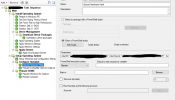
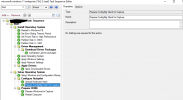
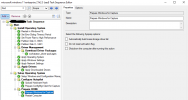
We are using SCCM task sequence to wipe bloatware from Lenovo. Just install windows. And after that we autopilot.
We have to manually upload hash if the device haven't been used for while and not picked up by mdm
Guys I really appreciate your help guys it would be more than Perfect if someone can help us with this
Theoretically this could be done. we have a service account with proper permissions created in Azure AD which has the permission to add devices to intune
Today we use this script to manually add the devices before we load them with autopilot. But it would be AMAZING if some powershell wiz kid could help us with a script where it runs the whole process below including the credentials part.
Powershell Script:
set-executionpolicy bypass
Install-script Get-WindowsAutopilotInfo -Force
confirm with Y (3 times )
Get-WindowsAutopilotInfo -Online -GroupTag: ABC123 -assign
now a window appears where its asks us to type in the credentials of a user/service account with proper permissions
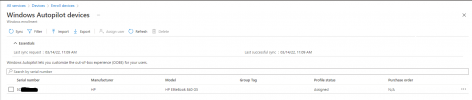
below an example of how we manually import the devices as described above

 oofhours.com
Does anyone have a good script that I can add during a task sequence that I can automatically upload the hash to autopilot devices?
We are using SCCM task sequence to wipe bloatware from Lenovo. Just install windows. And after that we autopilot.
We have to manually upload hash if the device haven't been used for while and not picked up by mdm
Guys I really appreciate your help guys it would be more than Perfect if someone can help us with this
Theoretically this could be done. we have a service account with proper permissions created in Azure AD which has the permission to add devices to intune
Today we use this script to manually add the devices before we load them with autopilot. But it would be AMAZING if some powershell wiz kid could help us with a script where it runs the whole process below including the credentials part.
Powershell Script:
set-executionpolicy bypass
Install-script Get-WindowsAutopilotInfo -Force
confirm with Y (3 times )
Get-WindowsAutopilotInfo -Online -GroupTag: ABC123 -assign
now a window appears where its asks us to type in the credentials of a user/service account with proper permissions
below an example of how we manually import the devices as described above
Importing a device hash directly into Intune
I resisted the urge to add a switch to the Get-WindowsAutopilotInfo script to add the device to Windows Autopilot using the Intune Graph API. But since people were doing it anyway in worse wa…
oofhours.com
Last edited: