Forums on Intune, SCCM, and Windows 11

Welcome to the forums. Register a free account today to become a member! Once signed in, you'll be able to participate on this site by adding your topics and posts, as well as connect with other members through your own private inbox!

PENDING Applications stuck at Downloading 0% complete for clients

  • Thread starter Thread starter mhpk0
  • Start date Start date
  • Replies Replies 9
  • Views Views 8K

mhpk0

Active Member
Messages
26
Solutions
4
Reaction score
0
Points
1
I have a new SCCM server set up and some clients pointed to it. The clients are properly checking in and can see the software deployed to them but any time I try to Install something, it just shows Downloading (0% complete) and never advances. We have a single SCCM server, so it is the Distribution Point. We are using HTTPS/PKI. I went through the following guide but still am having the same issue. https://www.prajwaldesai.com/sccm-application-download-stuck/
I have verified the following:
  • IP of client is in Boundaries and boundary is in Boundary Group
  • Boundary Group is set for Site Assignment and Site System Servers
  • Software is distributed to Distribution Point successfully
  • Checked the SCCM IIS HTTPS binding certificate
  • When I check LocationServices.log on a client - I am seeing the following:
Code:
Current AD site of machine is Default-First-Site-Name    LocationServices    5/14/2024 11:41:00 AM    22036 (0x5614)LS Request CorrelationID {F5757A52-D926-4F34-AD6C-655CB5508BC7} - Distribution Point='https://SCCM19.xx.com/CCMTOKENAUTH_SMS_DP_SMSPKG$/Content_1f864686-8847-4cb3-b5ba-6bc49e921e7f.1', Locality='BOUNDARYGROUP', Version='9122', Capabilities='<Capabilities SchemaVersion="1.0"><Property Name="SSL" Version="1"/><Property Name="SSLState" Value="63"/><Property Name="AuthMethod" Value="1024"/></Capabilities>', Signature='https://SCCM19.xx.com/CCMTOKENAUTH_SMS_DP_SMSSIG$/Content_1f864686-8847-4cb3-b5ba-6bc49e921e7f.1.tar', ForestTrust='TRUE', BlockInfo='0'    LocationServices    5/14/2024 11:41:00 AM    20148 (0x4EB4)
ConfigMgr is no longer managing WindowsDO GPO.  Set to default values. Mode = LAN. GroupID = empty    LocationServices    5/14/2024 11:41:00 AM    22036 (0x5614)
LS Request CorrelationID {28F77ABE-079B-4884-BBF0-6ED753F4E782} - Calling back with empty distribution points list    LocationServices    5/14/2024 11:41:00 AM    22036 (0x5614)
LS Request CorrelationID {F5757A52-D926-4F34-AD6C-655CB5508BC7} - Called back with 3 locations for location request {B4E6CD7C-5196-4848-B2C0-8CFB19FF610D}    LocationServices    5/14/2024 11:41:00 AM    20148 (0x4EB4)
Current AD site of machine is Default-First-Site-Name    LocationServices    5/14/2024 11:41:00 AM    19172 (0x4AE4)
ConfigMgr is no longer managing WindowsDO GPO.  Set to default values. Mode = LAN. GroupID = empty    LocationServices    5/14/2024 11:41:00 AM    19172 (0x4AE4)
LS Request CorrelationID {298B1B86-2668-4224-A842-F17D65C1828E} - Calling back with empty distribution points list    LocationServices    5/14/2024 11:41:00 AM    19172 (0x4AE4)
Current AD site of machine is Default-First-Site-Name    LocationServices    5/14/2024 11:41:00 AM    22036 (0x5614)
sRelatedContentIDs is <RelatedContentIDs><RelatedContentID ID="Content_42f43931-2d79-4959-bda1-88c53df6d432.1"/></RelatedContentIDs>. Length = 110    LocationServices    5/14/2024 11:41:00 AM    22036 (0x5614)
ConfigMgr is no longer managing WindowsDO GPO.  Set to default values. Mode = LAN. GroupID = empty    LocationServices    5/14/2024 11:41:00 AM    22036 (0x5614)
LS Request CorrelationID {7B9F419A-7B37-4907-88AD-35C0D7CECD96} - Calling back with the following distribution points    LocationServices    5/14/2024 11:41:00 AM    22036 (0x5614)
LS Request CorrelationID {7B9F419A-7B37-4907-88AD-35C0D7CECD96} - Distribution Point='http://SCCM19.xx.com/SMS_DP_SMSPKG$/Content_c7dbb61f-c35e-472f-ac4a-1db8363bc054.1', Locality='BOUNDARYGROUP', Version='9122', Capabilities='<Capabilities SchemaVersion="1.0"><Property Name="SSL" Version="1"/><Property Name="SSLState" Value="63"/></Capabilities>', Signature='http://SCCM19.xx.com/SMS_DP_SMSSIG$/Content_c7dbb61f-c35e-472f-ac4a-1db8363bc054.1.tar', ForestTrust='TRUE', BlockInfo='0'    LocationServices    5/14/2024 11:41:00 AM    22036 (0x5614)
LS Request CorrelationID {7B9F419A-7B37-4907-88AD-35C0D7CECD96} - Distribution Point='http://SCCM19.xx.com/NOCERT_SMS_DP_SMSPKG$/Content_c7dbb61f-c35e-472f-ac4a-1db8363bc054.1', Locality='BOUNDARYGROUP', Version='9122', Capabilities='<Capabilities SchemaVersion="1.0"><Property Name="SSL" Version="1"/><Property Name="SSLState" Value="63"/></Capabilities>', Signature='http://SCCM19.xx.com/NOCERT_SMS_DP_SMSSIG$/Content_c7dbb61f-c35e-472f-ac4a-1db8363bc054.1.tar', ForestTrust='TRUE', BlockInfo='0'    LocationServices    5/14/2024 11:41:00 AM    22036 (0x5614)
LS Request CorrelationID {7B9F419A-7B37-4907-88AD-35C0D7CECD96} - Distribution Point='https://SCCM19.xx.com/CCMTOKENAUTH_SMS_DP_SMSPKG$/Content_c7dbb61f-c35e-472f-ac4a-1db8363bc054.1', Locality='BOUNDARYGROUP', Version='9122', Capabilities='<Capabilities SchemaVersion="1.0"><Property Name="SSL" Version="1"/><Property Name="SSLState" Value="63"/><Property Name="AuthMethod" Value="1024"/></Capabilities>', Signature='https://SCCM19.xx.com/CCMTOKENAUTH_SMS_DP_SMSSIG$/Content_c7dbb61f-c35e-472f-ac4a-1db8363bc054.1.tar', ForestTrust='TRUE', BlockInfo='0'    LocationServices    5/14/2024 11:41:00 AM    22036 (0x5614)
LS Request CorrelationID {7B9F419A-7B37-4907-88AD-35C0D7CECD96} - Called back with 3 locations for location request {C25CB250-9318-4EE4-AE01-AFBA5775ED6F}    LocationServices    5/14/2024 11:41:00 AM    22036 (0x5614)
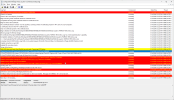
 
Well things got better and then worse. Now all installs just show Failed and never change to Downloading. But in the meantime, in the midst of me tinkering, some software did install properly.
 
I think I am on to something now. I tried to uninstall/reinstall the SCCM Client just to see if that would help. I get the following errors when installing the SCCM client.
Code:
Machine name is 'PATRICK-TEST.xx.com'.    ccmsetup    5/14/2024 2:32:41 PM    17076 (0x42B4)
Begin validation of Certificate [Thumbprint C228B6D64A074E55F6710C47B1C719D50CAEC888] issued to 'PATRICK-TEST.xx.com'    ccmsetup    5/14/2024 2:32:41 PM    17076 (0x42B4)
Allowing usage of CNG key storage.    ccmsetup    5/14/2024 2:32:41 PM    17076 (0x42B4)
The Certificate [Thumbprint C228B6D64A074E55F6710C47B1C719D50CAEC888] issued to 'PATRICK-TEST.xx.com' has 'Client Authentication' capability.    ccmsetup    5/14/2024 2:32:41 PM    17076 (0x42B4)
Completed validation of Certificate [Thumbprint C228B6D64A074E55F6710C47B1C719D50CAEC888] issued to 'PATRICK-TEST.xx.com'    ccmsetup    5/14/2024 2:32:41 PM    17076 (0x42B4)
>>> Client selected the PKI Certificate [Thumbprint C228B6D64A074E55F6710C47B1C719D50CAEC888] issued to 'PATRICK-TEST.xx.com'    ccmsetup    5/14/2024 2:32:41 PM    17076 (0x42B4)
ccmsetup: Host=SCCM19.xx.com, Path=/ccm_system/request, Port=443, Protocol=https, CcmTokenAuth=0, Flags=0x44300, Options=0x1e0    ccmsetup    5/14/2024 2:32:41 PM    17076 (0x42B4)
Created connection on port 443    ccmsetup    5/14/2024 2:32:41 PM    17076 (0x42B4)
Enabled SSL revocation check.    ccmsetup    5/14/2024 2:32:41 PM    17076 (0x42B4)
Trying without proxy.    ccmsetup    5/14/2024 2:32:41 PM    17076 (0x42B4)
Both AAD token auth and client PreAuth are not ready. Cannot get CCM token    ccmsetup    5/14/2024 2:32:41 PM    17076 (0x42B4)
Client doesn't have PKI issued cert and cannot get CCM access token. Error 0x8000ffff    ccmsetup    5/14/2024 2:32:41 PM    17076 (0x42B4)
[CCMHTTP] ERROR: URL=https://SCCM19.xx.com/ccm_system/request, Port=443, Options=480, Code=0, Text=CCM_E_NO_TOKEN_AUTH    ccmsetup    5/14/2024 2:32:41 PM    17076 (0x42B4)
[CCMHTTP] ERROR INFO: StatusCode=403 StatusText=Forbidden    ccmsetup    5/14/2024 2:32:41 PM    17076 (0x42B4)
Failed (0x87d00455) to send location request to 'SCCM19.xx.com'. StatusCode 403, StatusText 'Forbidden'    ccmsetup    5/14/2024 2:32:41 PM    17076 (0x42B4)
Failed to send location message to 'HTTPS://SCCM19.xx.com'. Status text 'Forbidden'    ccmsetup    5/14/2024 2:32:41 PM    17076 (0x42B4)
GetDPLocations failed with error 0x87d00455    ccmsetup    5/14/2024 2:32:41 PM    17076 (0x42B4)
Failed to get DP locations as the expected version from MP 'HTTPS://SCCM19.xx.com'. Error 0x87d00455    ccmsetup    5/14/2024 2:32:41 PM    17076 (0x42B4)
Sending state '101'...    ccmsetup    5/14/2024 2:32:41 PM    17076 (0x42B4)
Updating MDM_ConfigSetting.ClientDeploymentErrorCode with value 0    ccmsetup    5/14/2024 2:32:41 PM    17076 (0x42B4)
Failed to get client version for sending state messages. Error 0x8004100e    ccmsetup    5/14/2024 2:32:41 PM    17076 (0x42B4)
[] Params to send '5.0.9122.1000 Deployment Error: 0x0, '    ccmsetup    5/14/2024 2:32:41 PM    17076 (0x42B4)
A Fallback Status Point has not been specified and no client was installed.  Message with STATEID='101' will not be sent.    ccmsetup    5/14/2024 2:32:41 PM    17076 (0x42B4)
Failed to send status 101. Error (87D00215)    ccmsetup    5/14/2024 2:32:41 PM    17076 (0x42B4)
Next retry in 10 minute(s)...    ccmsetup    5/14/2024 2:32:41 PM    17076 (0x42B4)
 
I think you have not setup PKI properly because there is this error in the log file - Client doesn't have PKI issued cert and cannot get CCM access token. Error 0x8000ffff
 
Any ideas on why I am getting the error "Client doesn't have PKI issued cert and cannot get CCM access token."? Here is a screenshot of the log. The Certificate shown with Thumbprint EEB53597EB8A7BF380E3A01F3038A612A07024C2 is the correct certificate that I am needing to use. Where on the server side do I specify that? Is it just whatever is installed in the local computer certificate store?
 
Any ideas on why I am getting the error "Client doesn't have PKI issued cert and cannot get CCM access token."? Here is a screenshot of the log. The Certificate shown with Thumbprint EEB53597EB8A7BF380E3A01F3038A612A07024C2 is the correct certificate that I am needing to use. Where on the server side do I specify that? Is it just whatever is installed in the local computer certificate store?
ccmsetuplog.png
 
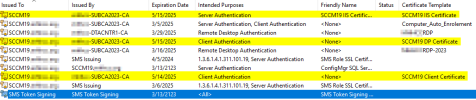
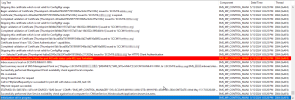
Sorry to keep bumping this. This definitely seems like an issue where the server is expecting a different Client certificate. I can't figure out how to get it working though. Here is a list of certificates on the SCCM server and then the MPControl.log showing the wrong certificate and 443 error. The highlighted certificates are the ones I want to use.
 

Attachments

  • certs1.png
    certs1.png
    32.3 KB · Views: 11
  • log1.png
    log1.png
    87.1 KB · Views: 11

Forum statistics

Threads
7,132
Messages
27,852
Members
18,148
Latest member
therealLawrence
Back
Top