
In a previous thread I thought I had solved this issue by updating SCCM to 2509 but it hadn't!
CHAT GPT provided me with a concise answer to application install hanging issues during task sequences with OS deployments 24H2 and 25H2.
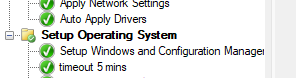
If you are experiencing this issue, add this command line timeout directly after the Setup Windows and Configuration Manager step within the TS
cmd.exe /c timeout /t 300
CHAT GPT results on this subject...
What changed in Windows 11 24H2 / 25H2 that breaks OSD app installs
Starting in 24H2, Microsoft made multiple under-the-hood changes that affect SYSTEM-context installers during OSD:
1. App install timing is more sensitive
In 24H2+, Windows services and WMI are not fully ready immediately after:
Setup Windows and ConfigMgr
ConfigMgr starts app installs too early, causing:
MSI installs to stall
EXE installers to never return
Detection logic to never evaluate
23H2 didn’t have this timing issue.
2. WMI / CCMExec readiness regression
In 24H2/25H2:
CCMExec may be running
But WMI providers are not fully initialized
Apps that:
Query WMI
Use PowerShell detection
Depend on MSI service readiness
 Hang indefinitely
3. Windows Installer service starts later
In 24H2+, msiserver is delayed longer after first boot.
If your 3rd/4th app is MSI-based:
It waits forever.
Why it always hangs on the 3rd or 4th app
By that point:
TS is already in full OS
ConfigMgr client is partially initialized
First few apps may install
Later ones hit WMI/MSI timing issues
This pattern is very characteristic of 24H2 OSD.
The KNOWN WORKING FIX (used widely in 24H2 deployments)
 Add a forced delay after ConfigMgr is installed
Immediately after Setup Windows and ConfigMgr, add:
Option A – Simple (most common)
Run Command Line
cmd.exe /c timeout /t 300
(5 minutes — yes, really)
CHAT GPT provided me with a concise answer to application install hanging issues during task sequences with OS deployments 24H2 and 25H2.
If you are experiencing this issue, add this command line timeout directly after the Setup Windows and Configuration Manager step within the TS
cmd.exe /c timeout /t 300
CHAT GPT results on this subject...
What changed in Windows 11 24H2 / 25H2 that breaks OSD app installs
Starting in 24H2, Microsoft made multiple under-the-hood changes that affect SYSTEM-context installers during OSD:
1. App install timing is more sensitive
In 24H2+, Windows services and WMI are not fully ready immediately after:
Setup Windows and ConfigMgr
ConfigMgr starts app installs too early, causing:
MSI installs to stall
EXE installers to never return
Detection logic to never evaluate
23H2 didn’t have this timing issue.
2. WMI / CCMExec readiness regression
In 24H2/25H2:
CCMExec may be running
But WMI providers are not fully initialized
Apps that:
Query WMI
Use PowerShell detection
Depend on MSI service readiness
Hang indefinitely3. Windows Installer service starts later
In 24H2+, msiserver is delayed longer after first boot.
If your 3rd/4th app is MSI-based:
It waits forever.Why it always hangs on the 3rd or 4th app
By that point:
TS is already in full OS
ConfigMgr client is partially initialized
First few apps may install
Later ones hit WMI/MSI timing issues
This pattern is very characteristic of 24H2 OSD.
The KNOWN WORKING FIX (used widely in 24H2 deployments)
Add a forced delay after ConfigMgr is installedImmediately after Setup Windows and ConfigMgr, add:
Option A – Simple (most common)
Run Command Line
cmd.exe /c timeout /t 300
(5 minutes — yes, really)

