Colleagues, good afternoon!
I've been struggling with an issue for a week now, and I would like to ask for your help in resolving it.
Thank you in advance!
The task at hand is quite straightforward: to reinstall Windows 11 Enterprise LTSC 24H2 on a computer that already has Windows 11 Enterprise LTSC 24H2 installed.
After I launch this task through the Software Center, the task sequence progresses to the "Restart in Windows PE" step, at which point a general error (0x80004005) occurs, and the computer does not restart because the step was not completed.
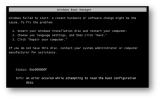
If the computer is restarted after the error occurs, a boot error 0xc000000f appears during startup. This error is relatively easy to resolve by repairing the boot using the command BOOTREC /REBUILDBCD. The error is attached in the file named "error 0xc000000f".
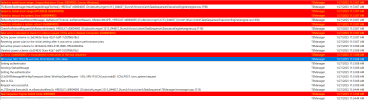
While examining the smsts.log file, I see the following lines:
Based on the log file and a thorough review of all similar issues found online (I have repeatedly studied all the topics on all forums), I have taken the following steps:
The problem occurs on two different computer models:
If you look at the two smsts files, one with a successful installation and the other with an unsuccessful one, you can also notice a strange error listed below in the screenshot. However, considering that this error did not affect the successful installation on the HP EliteBook 840 G10 laptop, I think it can be ignored.
I will also attach the successful smsts log file; perhaps it can shed some light on the error.
I honestly admit that I'm at a dead end and I ask for your help in solving my problem. If logs or any additional information are needed, I will be happy to provide them. I would even be relieved if someone tells me that the issue is with the hardware and cannot be solved in my case, because this problem has been stuck in my head, and I would gladly be rid of it.
I've been struggling with an issue for a week now, and I would like to ask for your help in resolving it.
Thank you in advance!
The task at hand is quite straightforward: to reinstall Windows 11 Enterprise LTSC 24H2 on a computer that already has Windows 11 Enterprise LTSC 24H2 installed.
After I launch this task through the Software Center, the task sequence progresses to the "Restart in Windows PE" step, at which point a general error (0x80004005) occurs, and the computer does not restart because the step was not completed.
If the computer is restarted after the error occurs, a boot error 0xc000000f appears during startup. This error is relatively easy to resolve by repairing the boot using the command BOOTREC /REBUILDBCD. The error is attached in the file named "error 0xc000000f".
While examining the smsts.log file, I see the following lines:
Based on the log file and a thorough review of all similar issues found online (I have repeatedly studied all the topics on all forums), I have taken the following steps:
- Created new Task Sequences.
- Set "Restart in Windows PE" as the first step.
- Reinstalled the operating system on the problematic computers using a clean image downloaded from Microsoft.
- Added drivers to WinPE.
- Disabled Secure Boot and SCM in BIOS.
- Updated BIOS.
- Updated SCCM to the latest version 2409 build 5.0.9132.100.
- Updated ADK to the latest available version.
The problem occurs on two different computer models:
- MSI PRO DP10 13M (MiniPC)
- Custom-built computer from 2024 (with modern hardware)
- HP EliteBook 840 G10 laptop
- Acer d18w3 (MiniPC)
- Custom-built computer from 2024
- Virtual machine in VMware
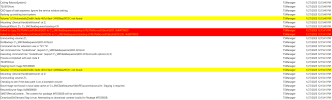
If you look at the two smsts files, one with a successful installation and the other with an unsuccessful one, you can also notice a strange error listed below in the screenshot. However, considering that this error did not affect the successful installation on the HP EliteBook 840 G10 laptop, I think it can be ignored.
I will also attach the successful smsts log file; perhaps it can shed some light on the error.
I honestly admit that I'm at a dead end and I ask for your help in solving my problem. If logs or any additional information are needed, I will be happy to provide them. I would even be relieved if someone tells me that the issue is with the hardware and cannot be solved in my case, because this problem has been stuck in my head, and I would gladly be rid of it.